

Accounts Payable
Business flow
Accounts Payable (AP) covers the flow of receiving e-invoices from your suppliers and managing them inside your system. With Staple, your team does not need to integrate directly with each country’s tax authority or with the Peppol network — Staple acts as the central hub between your business and every supported e-invoicing network.
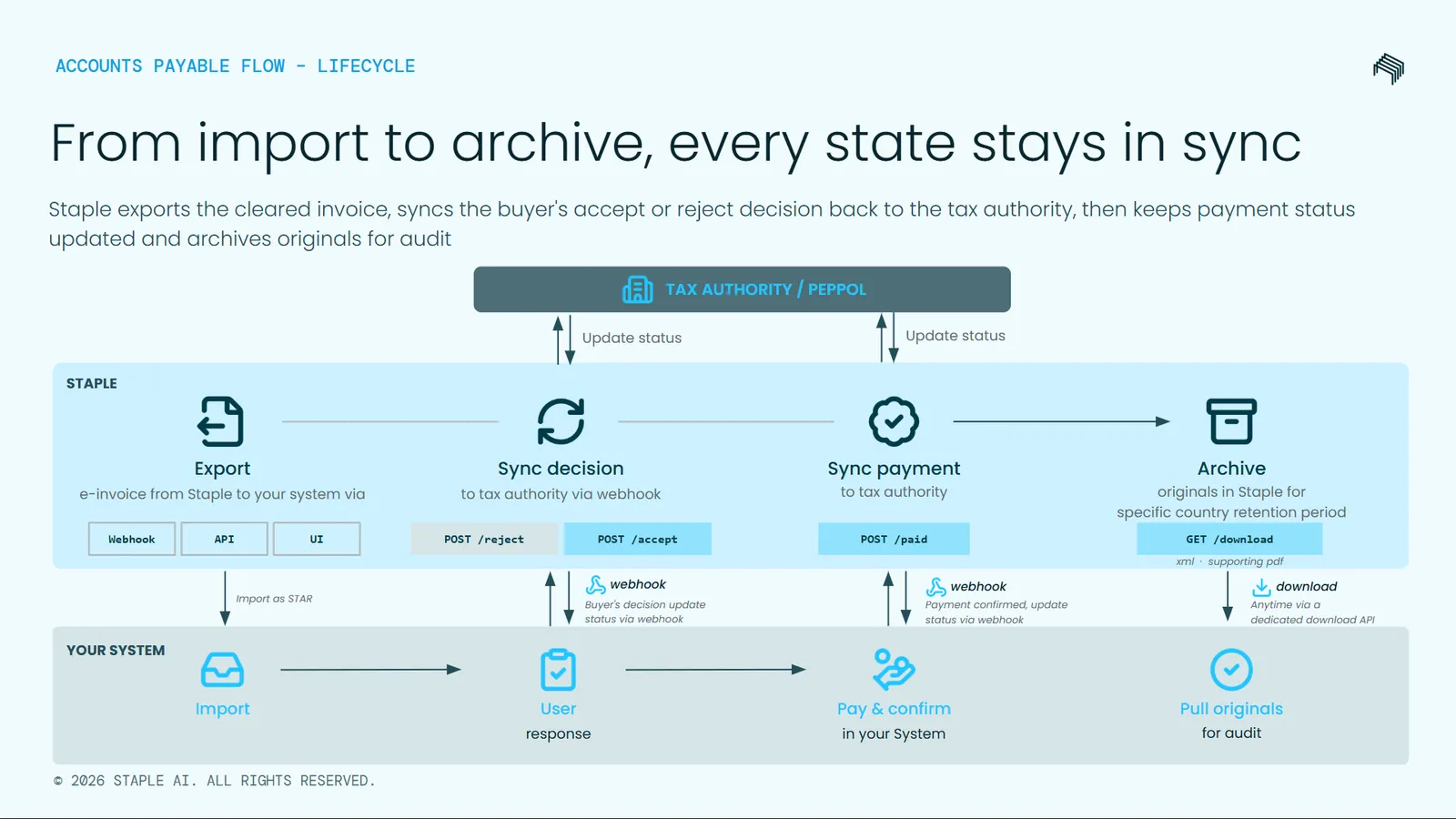
The flow works as follows:
- Staple receives the invoice. A supplier issues an e-invoice. The invoice is delivered to Staple through the relevant national e-invoicing platform (such as KSeF in Poland, MyInvois in Malaysia, or SDI in Italy) or through the Peppol network. Staple receives and stores the invoice on your behalf.
- Staple notifies your system. A webhook is sent to your registered endpoint as soon as the invoice is uploaded into Staple. The notification carries the identifiers your system needs to retrieve the invoice in the next step.
- Your system retrieves the invoice in STAR format. Using the
documentIdfrom the webhook, your system calls the Export endpoint and receives the invoice as a STAR JSON payload — the same unified schema Staple uses for every supported country. The response also includes validation proof from the tax authority or Peppol. - Your team acts on the invoice. Your AP team reviews the invoice in your accounting or ERP system and decides what to do with it. They can accept it, reject it, or mark it as paid once payment has been made.
- You notify Staple of the decision. For each decision, your system calls the corresponding Staple endpoint — Accept, Reject, or Paid.
- Staple synchronises the status. Where the tax authority or Peppol network requires the status to be reported back (for example, an invoice acknowledgement or a paid notification), Staple handles that synchronisation automatically.
- The original document is available for download. Whenever you need the original e-invoice file — for audit, dispute resolution, or archival — you can retrieve it through the Download original document endpoint.
Document state machine
Every received e-invoice progresses through a small set of states inside Staple. The state machine below shows the valid transitions:
- A document starts in the
Receivedstate as soon as Staple receives it from the tax authority or the Peppol network. - Calling Accept moves the document from
ReceivedtoAccepted. - Calling Reject moves the document from
ReceivedtoRejected. - Calling Paid moves the document from
AcceptedtoPaid. Paid is only valid from theAcceptedstate. - Once a document is in
Accepted, it cannot be rejected. RejectedandPaidare terminal states — no further transitions are possible.
Each AP endpoint requires you to identify the document being acted on. You can use either of two identifiers, depending on how the document entered Staple:
documentId— used for paper invoices that customers send to Staple via email or other channels. Staple scans the document, extracts the data, and assigns adocumentId. Paper invoices do not have a tax authority reference.taxAuthorityReference— used for e-invoices that Staple pulls from the tax authority or the Peppol network. This is the unique identifier assigned by the tax authority. The exact form depends on the country:
Exactly one of documentId or taxAuthorityReference must be supplied on every Accept, Reject, and Paid request. The same rule applies to the Download original document endpoint, which accepts an array of docIds.
Webhook notifications
When a new e-invoice arrives at Staple, your system is notified through a webhook so you can retrieve the invoice and act on it without polling.
To start receiving webhook notifications, subscribe to the Document uploaded event in the Staple UI:
- In Staple, open User Profile → Webhooks.
- Configure a webhook URL on your server and subscribe to the Document uploaded event.
You will need the Manage webhooks permission in your Staple workspace to configure webhooks. If you do not see the Webhooks page in your User Profile, contact your workspace administrator.
Webhook payload
When a new document — including an inbound e-invoice — is uploaded to Staple, the following payload is delivered to your registered webhook URL:
For paper invoices, taxAuthorityReference will be null.
Use the documentId (or taxAuthorityReference if you prefer) from this payload to retrieve the e-invoice in STAR format through the Export endpoint described in the next section.
Export documents
POST https://api.staple.io/v1/documents/export
Export one or more received documents in your chosen format. For e-invoices, exporting in STAR format returns the invoice as a country-agnostic JSON payload that your accounting or ERP system can process consistently regardless of which country the invoice came from.
The response also includes a validation block confirming whether the invoice has been validated by the tax authority or the Peppol network — and when — so your system can rely on the data without performing its own validation.
Bearer token, e.g. Authorization: Bearer <token>.
One or more Staple document IDs to export.
Export format. Allowed values: STAR, CSV, JSON, TXT, XML. Default is CSV. For e-invoices, use STAR.
The response contains the STAR payload for each requested document, along with a validation block.
Validation block
The full STAR schema reference is documented in Schema Objects.
Accept
POST https://api.staple.io/v1/documents/move/accepted
Notify Staple that your AP team has accepted an invoice. This moves the document from Received to Accepted. For e-invoices, Staple synchronises the acceptance status to the relevant tax authority or the Peppol network. For paper invoices, only the local state is updated.
Bearer token, e.g. Authorization: Bearer <token>.
Document identifier for paper invoices. Exactly one of documentId or taxAuthorityReference is required.
Opaque tax authority identifier for e-invoices. Exactly one of documentId or taxAuthorityReference is required.
Reject
POST https://api.staple.io/v1/documents/move/rejected
Notify Staple that your AP team has rejected an invoice. This moves the document from Received to Rejected. For e-invoices, Staple synchronises the rejection to the tax authority or the Peppol network. For paper invoices, only the local state is updated.
Once a document has been accepted, it can no longer be rejected through this endpoint.
Bearer token, e.g. Authorization: Bearer <token>.
Document identifier for paper invoices. Exactly one of documentId or taxAuthorityReference is required.
Opaque tax authority identifier for e-invoices. Exactly one of documentId or taxAuthorityReference is required.
One or more rejection reasons.
Paid
POST https://api.staple.io/v1/documents/move/paid
Notify Staple that an accepted invoice has been paid. This moves the document from Accepted to Paid. Payment metadata is required for e-invoices, where the payment status must be reported externally. For paper invoices, payment metadata is optional.
Partial payments are not supported in the current release — Paid is treated as a single terminal event for the full invoice amount.
Bearer token, e.g. Authorization: Bearer <token>.
Document identifier for paper invoices. Exactly one of documentId or taxAuthorityReference is required.
Opaque tax authority identifier for e-invoices. Exactly one of documentId or taxAuthorityReference is required.
Payment metadata. Required for e-invoices, optional for paper invoices.
payment fields
Payment timestamp in ISO 8601 format, e.g. 2026-05-21T10:30:00Z.
Amount paid, 2 decimal places, e.g. "1500.00".
ISO 4217 currency code, e.g. EUR.
External payment transaction reference, e.g. TXN-12345.
Payment method identifier, e.g. bank_transfer.
syncStatus values
Every response from the Accept, Reject, and Paid endpoints includes a syncStatus field. This indicates whether and how the state change has been synchronised externally with the tax authority or the Peppol network.
Search documents
POST https://api.staple.io/v2/search/documents
Search for documents using filters such as document ID, tax authority reference, status, date range, and queue. This endpoint is useful when your buyer-side team needs to look up a specific e-invoice or list all e-invoices in a given state.
Bearer token, e.g. Authorization: Bearer <token>.
Filter criteria. See the fields below.
Pagination control. See the fields below.
filter object fields
pagination object fields
The underlying endpoint supports additional filters used elsewhere in the Staple platform (such as filename and content search) — those filters are omitted here as they are not commonly used in e-invoice workflows.
Download original document
POST https://api.staple.io/v1/documents/download
Download the original files of one or more received documents. The response is a ZIP archive containing the original files (for example, the raw XML for an e-invoice or the source PDF for a scanned paper invoice).
This endpoint is useful for audit, dispute resolution, or archival — when you need the exact file Staple received from the supplier or the tax authority.
Bearer token, e.g. Authorization: Bearer <token>.
application/json.
Array of document IDs to download.
The response is a stream of ZIP-archive bytes containing the original file for each requested document. Save the response stream to disk and unzip to access the individual files.