
Accounts Receivable
Business flow
Accounts Receivable (AR) covers the flow of issuing e-invoices from your business to your customers. With Staple, your accounting or ERP system does not need to integrate directly with each country’s tax authority or with the Peppol network — Staple handles all the country-specific format conversion, validation, and transport on your behalf.
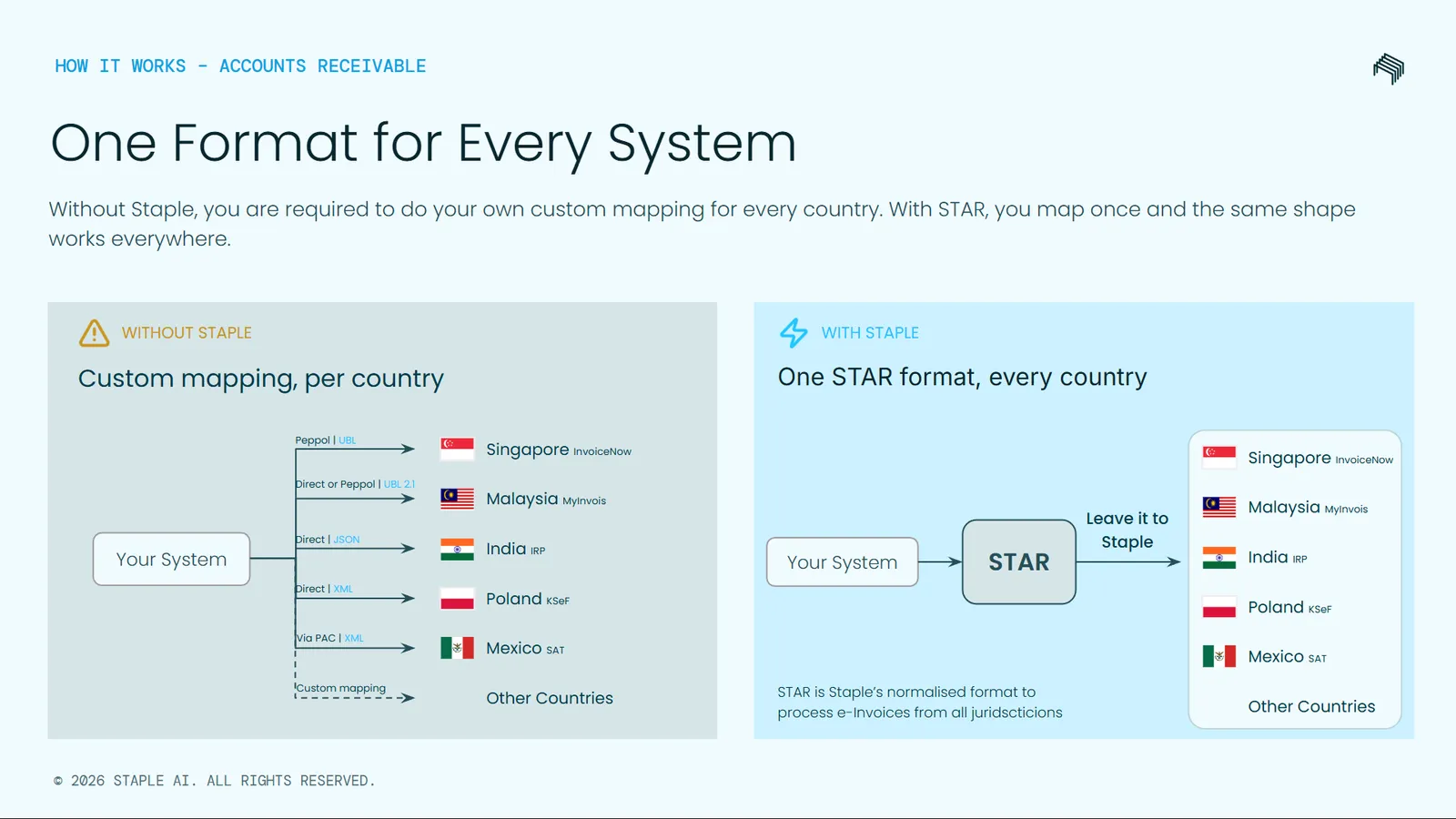
One format, every country: STAR
Every country defines its own e-invoice format. Singapore uses Peppol UBL. Malaysia uses MyInvois UBL 2.1. India uses IRP JSON. Poland uses KSeF XML. Mexico uses CFDI XML. Each format has its own field names, structure, and validation rules. If your business operates in more than one country, integrating directly with each format multiplies the engineering work with every country added.
To remove this burden, Staple defines a single unified schema called STAR — Staple Transactional API Records. STAR is a country-agnostic representation of an invoice. You map your ERP data to STAR once, and Staple takes responsibility for converting STAR into the format each tax authority expects.
The full STAR schema reference is documented in Schema Objects.
How the AR flow works
The flow works as follows:
- Your system produces a STAR invoice. Your accounting or ERP system constructs an invoice in STAR format using the data fields documented in the Schema Objects reference.
- Submit the invoice to Staple. Your system calls the Submit endpoint with the STAR payload. Staple acknowledges receipt and queues the invoice for processing. The acknowledgement returns a
docIdyou will use in subsequent steps. - Staple validates and clears the invoice. Behind the scenes, Staple performs two distinct steps:
- Validation — Staple converts the STAR payload into the destination country’s e-invoice format and validates it against the schema and the relevant tax authority’s rules.
- Clearance — Once validation passes, Staple submits the converted invoice to the tax authority portal or the Peppol network. The tax authority returns a clearance reference (such as a MyInvois UUID, SDI IdentificativoSdI, KSeF number, or IRN) that legally identifies the issued invoice.
- Your system learns the outcome. You can learn the outcome in two ways:
- Push — subscribe to webhook events and Staple notifies your server when each step completes.
- Pull — call the Get invoice status endpoint at any time with the
docIdto retrieve the current validation status and clearance evidence.
- Your buyer may accept, reject, or pay the invoice. Days or weeks later, the buyer at the receiving end may take action on the invoice you issued. If you want to be notified of buyer actions — particularly rejections — you can subscribe to the relevant webhook event.
Country support
Staple’s AR flow supports all 12 countries: 🇸🇬 Singapore · 🇨🇳 China · 🇲🇾 Malaysia · 🇵🇱 Poland · 🇫🇷 France · 🇧🇪 Belgium · 🇮🇹 Italy · 🇩🇪 Germany · 🇪🇸 Spain · 🇧🇷 Brazil · 🇲🇽 Mexico · 🇮🇳 India. Country-specific behaviour, required fields, and validation rules are documented inside each schema object and on the per-country payload pages.
Submit API
POST https://api.staple.io/v2/einvoice/submit/queue/:queueId
Submit a STAR e-invoice to Staple for conversion, validation, and submission to the destination country’s tax authority or the Peppol network. Compliance processing runs asynchronously — this endpoint acknowledges receipt of the payload and returns identifiers you can use to track the outcome.
The queue ID the document should land in.
Bearer token, e.g. Authorization: Bearer <token>.
The full STAR invoice payload. See Schema Objects for the complete schema reference.
The example above shows a minimum payload for Germany. The required fields and country-specific extensions differ for each supported country. See the Request Payloads section for the minimum payload example per country.
Response fields
After submission, validation and clearance run asynchronously. To learn the outcome, either subscribe to the webhook events described in Webhook notifications below, or pull the current status using the Get invoice status endpoint.
Get invoice status
GET https://api.staple.io/v1/documents/{identifier}
Retrieve the current validation and clearance status of an e-invoice you previously submitted. Use this endpoint when you need to check the outcome on demand — for example, when reconciling with your accounting system or troubleshooting a specific invoice.
The response is country-agnostic. Country-specific clearance evidence (such as MyInvois UUID, SDI IdentificativoSdI, or KSeF number) is returned inside the clearance block.
Either the Staple docId (integer) returned by the Submit endpoint, or the taxAuthorityReference (string) such as a MyInvois UUID or KSeF number. The endpoint detects the type automatically.
Bearer token, e.g. Authorization: Bearer <token>.
validation block
The validation block describes whether the submitted invoice passed Staple’s internal validation and the tax authority’s schema-level rules.
clearance block
The clearance block describes whether the tax authority or the Peppol network has accepted the invoice and what evidence has been issued.
Search documents
POST https://api.staple.io/v2/search/documents
Search for e-invoices you have issued. Filter by Staple document ID, your own invoice number, tax authority reference, status, or date range. This endpoint returns a paginated list of summary results — for full validation and clearance details on a specific invoice, use the Get invoice status endpoint.
Bearer token, e.g. Authorization: Bearer <token>.
Filter criteria. See the fields below.
Pagination control. See the fields below.
filter object fields
pagination object fields
The underlying endpoint supports additional filters used elsewhere in the Staple platform (such as filename and content search) — those filters are omitted here as they are not commonly used in e-invoice workflows.
Webhook notifications
Subscribe to webhook events so your system is notified when Staple completes asynchronous processing of an e-invoice you submitted — without polling. Configure your webhook URL in User Profile → Webhooks. You will need the Manage webhooks permission to do this.
Three e-invoice events are available:
Webhook payload — document.validation_completed
When validation fails, the faults array contains the validation errors: