
Reconciliation flow
Invoice/PO/Delivery order reconciliation flow (with/without human validation)
Another feature provided by Staple is matching documents. Users can compare multiple documents to extract similar data. This is facilitated by “Matching Documents”. This feature allows users to set the criteria for matching documents and applies them to the selected documents. The flow to do so using API and UI is mentioned below:
Login: The user has to log in through the API to generate JWT tokens. These are used to validate the operations performed.
Create queues: Using the API or UI, the user needs to create at least 2 queues with documents to be matched. Upload the documents in the queues. See the user guide for more details on how to do this
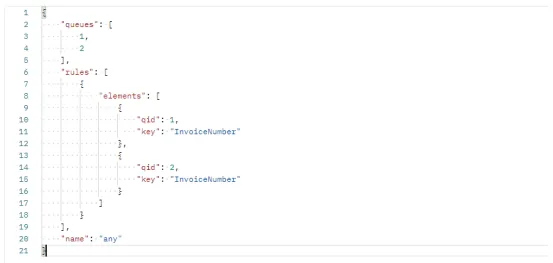
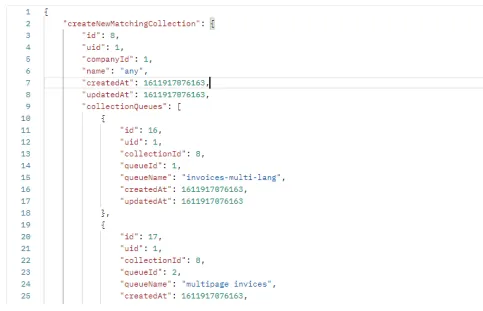
Create a matching collection (UI/API): POST Create Matching Collection Users can create a matching collection using the API. The endpoint “Create matching collection helps create the collection. To validate the user, the access token and api-key are used. Thereafter, the body of the request takes in the queue ids as an array and the rules for matching. Request:
- POST Create Matching Collection
Request
Response
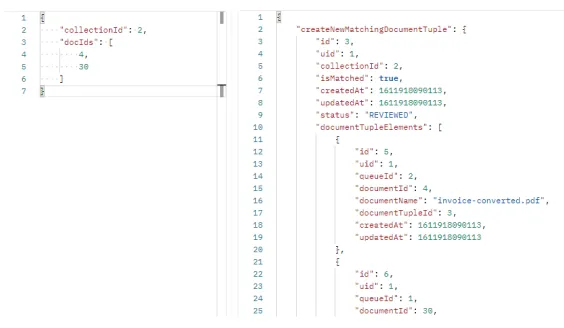
Create matching documents (UI/API) (auto-match or manual match): Users can match their documents manually or automatically. This can be facilitated by an API request “Create matching documents”. First, the user needs to fill up the headers with the api-key and access token. Followed by filling up the body of the request. The body will take two fields, collection id and documents’ id. It will return the match in JSON format.
- POST Create Matching Documents
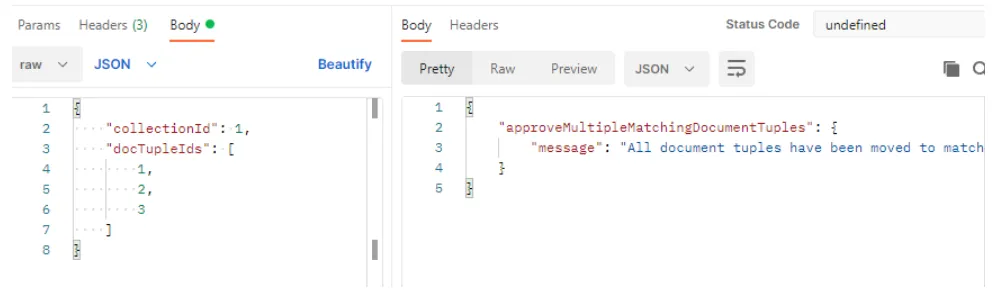
Approve matching doc (Move to matched): Users can approve the match and move it to “Matched” once the match is validated. The document tuple id helps in doing so. Users can pass this as a parameter in the URL or as a request body.
- PUT Approve Matching Document