
For AI agents: a documentation index is available at the root level at /llms.txt and /llms-full.txt. Append /llms.txt to any URL for a page-level index, or .md for the markdown version of any page.
Home
Home
  • Support Hub
    • Product Enhancements
LogoLogo
On this page
  • March 1, 2026
  • 1. Scanning Performance and Reliability Improvements
  • 2. Copy and Paste Fields in Model Builder (Sidebar Fields)
  • 3. Localisation Expansion (Chinese & Japanese)
  • 4. Webhook Workflow Enhancement (Manual Trigger Support)
  • Minor enhancements
  • February 1, 2026
  • 1. Search and Sorting for Queues and Models
  • 2. Label Support for Reconciliation
  • 3. Configurable Document Display Name in Reconciliation
  • 4. Dashboard Localisation (Chinese and Japanese)
  • 5. Complex Table Type Consolidation
  • Minor enhancements
  • January 1, 2026
  • Scanned Document View in Reconciliation
  • Sidebar Field Reordering in Custom Models
  • Germany E-Invoice Support (Peppol integration)
  • Edit Document Page Layout Preference
  • Product Localisation
  • Move Documents Between Received and Uploaded States
  • Minor enhancements
  • December 1, 2025
  • Search by Document ID
  • User Edit Management & Order of Precedence
  • Direct document access from the Reconciliation screen
  • Other product enhancements
  • November 1, 2025
  • What's new this month?
  • Force Unmatch (Manual Removal of Incorrect Matches)
  • Multi-Key Document Matching
  • Scanning List View with Row Count Preference
  • Expanded Document Counter Categories
  • OAuth2.0 Authentication for Company-Level Webhooks
  • October 1, 2025
  • Document Editor: control before processing
  • Complex table types, better grouping, faster extraction
  • Product enhancement releases
  • September 1, 2025
  • Reconciliation by Staple AI: Identify mismatches while you sleep
  • Master Data Mapping by Staple AI
  • Label Rules Enhancements
  • Expanded File Format Support: .BMP Image Support
  • August 1, 2025
  • Custom Staple Email Integration
  • Email Notifications for Document Upload
  • Other minor product enhancements
  • November 1, 2024
  • View number of documents
  • Open a document in a new tab

Product Enhancements

Monthly release notes for Staple AI

Stay up to date with everything new in Staple AI — new features, enhancements, and fixes shipped each month. Subscribe via RSS to get release notes as they go out.

March 1, 2026
March 1, 2026

February 1, 2026
February 1, 2026

January 1, 2026
January 1, 2026

December 1, 2025
December 1, 2025

November 1, 2025
November 1, 2025

October 1, 2025
October 1, 2025

September 1, 2025
September 1, 2025

August 1, 2025
August 1, 2025

November 1, 2024
November 1, 2024
Built with

March '26

March’s release focuses on improving scanning performance, global usability, model configuration efficiency, integration flexibility, and data accessibility. These updates reduce manual effort, improve reliability, and make the platform more scalable for enterprise workflows.

1. Scanning Performance and Reliability Improvements

Document scanning has been enhanced to improve both processing speed and reliability, especially for large and complex documents.

How it works

  • Processing has moved from sequential to concurrent execution, allowing documents to be broken down and processed in parallel
  • Improves performance for large documents (e.g., multi-page files)
  • Introduces a self-healing mechanism for handling failures
  • If a specific step (e.g., table detection) fails, only that step is retried instead of reprocessing the entire document
  • Retry attempts are controlled with a maximum limit to prevent infinite loops

Benefits

  • Faster processing of large documents
  • Improved system throughput
  • Reduced failure rates
  • No need for manual retries

2. Copy and Paste Fields in Model Builder (Sidebar Fields)

Creating similar templates previously required manually re-tagging fields, even when configurations were identical.

This release introduces copy and paste functionality for sidebar fields in Model Builder.

How it works

  • Copy field configurations from one template
  • Paste them into another template
  • Uses browser clipboard for transferring field configurations

Benefits

  • Faster template creation
  • Eliminates repetitive field tagging
  • Useful for creating similar template variants

3. Localisation Expansion (Chinese & Japanese)

Localisation support has been expanded further across the platform to improve usability for international teams.

What’s included

Localisation now covers:

  • Profile page
  • Role management
  • Analytics
  • Advanced search
  • Queue list
  • Model builder
  • Scanning tabs
  • Hover messages
  • Email templates
  • Label actions

Supported languages:

  • Chinese
  • Japanese

Benefits

  • More complete localisation across workflows
  • Improved usability for global teams
  • Better adoption in regional markets

4. Webhook Workflow Enhancement (Manual Trigger Support)

Webhook creation previously required selecting an event, which prevented manual or ad-hoc workflows.

This release introduces support for event-optional webhook configuration.

How it works

  • Event selection is now optional
  • Webhooks can be created without selecting any system event
  • Enables manual triggering of webhooks

Benefits

  • Supports ad-hoc integrations
  • Enables manual workflows
  • Allows reuse of webhook endpoints

Minor enhancements

1. Include Email Metadata in Export and Download

Email metadata was previously available in the system but not included in exported or downloaded data.

This release enables email metadata to be included in all exports and downloads.

How it works

Included metadata fields:

  • From
  • CCs
  • Date & Time
  • Subject
  • Email body

Available in:

  • UI downloads and exports (single and bulk)
  • API downloads and exports

Benefits

  • Improved downstream data processing
  • Better traceability of document origin
  • Eliminates dependency on Concur-specific exports

2. Role-Based Access for Multiple Export and Document Actions

Document actions were previously not controlled at a granular level based on user roles.

This release introduces role-based access control for export and document actions.

What’s included

  • Multiple export (re-export) restricted based on user roles

  • Role-based control for:

  • Removing documents

  • Removing exported documents

Benefits

  • Better governance and control
  • Prevents unintended actions
  • Aligns actions with user permissions

3. TypeORM Upgrade

The backend ORM layer has been upgraded to improve system stability and maintainability.

What’s included

  • Upgrade to latest TypeORM version
  • Replacement of deprecated query methods
  • Migration to updated architecture patterns

Benefits

  • Improved stability
  • Reduced technical debt
  • Better long-term maintainability

February '26

February’s release focuses on improving navigation, reconciliation flexibility, localisation, and document processing accuracy. These updates make it easier to manage large numbers of queues and models, add greater control to reconciliation workflows, and improve the platform experience for international teams.

1. Search and Sorting for Queues and Models

Managing a large number of Queue Groups, Queues, and Models can make navigation difficult. Previously, users relied on browser search to locate items, which did not preserve queue hierarchy and made it harder to understand context.

This release introduces native search and sorting capabilities to improve discoverability and help users prioritize their work more efficiently.

search and sorting queues and models

How it works

Search

Users can now search for Queue Groups and Queues directly from the Queues page.

  • Search results update automatically as users type.
  • Results preserve the queue hierarchy, showing the Queue Group and its associated queues.
  • If a Queue Group matches the search, all its child queues are displayed.
  • If a Queue matches the search, the system displays the queue together with its parent Queue Group.

Users can also search Models by name from the Models page.

Sorting

Queues can now be sorted using multiple criteria:

  • Name (A–Z / Z–A)
  • Created Date (Newest First / Oldest First)
  • Latest Document Uploaded
  • Pending Documents (Uploaded + Received)

Models can also be sorted alphabetically:

  • Name (A–Z)
  • Name (Z–A)

Benefits

  • Faster navigation across Queue Groups, Queues, and Models
  • Improved discoverability in environments with many queues
  • Ability to prioritize queues with recent activity or higher workload
  • Reduced reliance on browser search workarounds

2. Label Support for Reconciliation

Reconciliation previously relied only on system-generated statuses such as Fully Reconciled, Partially Reconciled, Not Reconciled, and Error. These statuses were sometimes insufficient to represent business-specific reconciliation scenarios.

This release introduces custom labels for reconciliation, allowing users to classify reconciliation results based on configurable business rules.

How it works

Users can now create reconciliation rules using field comparisons: When the rule condition is satisfied, a user-defined label is automatically applied to the reconciliation.

Example:

  • If Invoice Amount > Purchase Order Amount, the reconciliation can be labeledOvercharged.
  • If Delivery Order Amount < Purchase Order Amount, the reconciliation can be labeledNot Fully Delivered.

Custom labels work alongside the existing reconciliation statuses without changing current workflows.

Benefits

  • Greater flexibility in representing reconciliation outcomes
  • Ability to implement business-specific reconciliation logic
  • Improved visibility when reviewing reconciliation results

3. Configurable Document Display Name in Reconciliation

Previously, the system used file name as the primary identifier for documents in reconciliation views. File names are often auto-generated and not meaningful for users.

This release allows customers to configure a business-relevant field to display as the document identifier.

How it works

A new configuration allows users to define a display_name_field for each document type.

Examples of display fields:

  • Invoice Number
  • Purchase Order Number

When configured, the selected field appears as the primary document identifier in reconciliation lists and document links.

If no display field is configured, the system continues to display the file name.

Benefits

  • Improves readability in document lists and reconciliation views
  • Aligns document identification with real business identifiers
  • Makes reconciliation workflows easier to interpret

4. Dashboard Localisation (Chinese and Japanese)

Staple now supports localisation for Chinese and Japanese users across the main dashboards.

This enhancement allows users to interact with the platform in their preferred language, improving usability for international teams.

What’s included

Chinese localisation is now available for:

  • Staple Dashboard
  • Reconciliation Dashboard
  • Document Editor Dashboard

dashboard localisation

The platform interface, including buttons, labels, notifications, and messages, is translated to support Chinese-speaking users.

Japanese localisation support has also been extended to improve accessibility for teams operating in Japan.

Benefits

  • Better usability for Chinese and Japanese users
  • Improved accessibility for global teams
  • Supports adoption of Staple AI in international markets

5. Complex Table Type Consolidation

Some documents contain multiple tables of the same category on a single page. Previously, these tables were processed separately, which could create duplicate table structures.

This release introduces automatic consolidation of tables with the same category.

How it works

  • Tables with the same category on the same page are automatically merged.
  • During annotation, the UI enforces a rule allowing only one table instance per category per page.

Benefits

  • Cleaner document structure
  • Easier review of extracted data
  • Reduced duplication in table extraction

Minor enhancements

1. Complex Table Translation Workflow Improvements

Previously, complex table extraction always triggered translation requests to the translation service, even when translation was disabled or unnecessary. This caused unnecessary processing overhead.

This release improves the translation workflow for complex table extraction.

Benefits
  • Reduced processing time for English documents
  • Improved extraction accuracy
  • Lower load on translation services
  • Consistent translation behavior across scanning and Smart Fill workflows

2. Removal of Predefined Model and Smart Table UI Options

To simplify the product interface and align with the current architecture, several legacy options have been removed from the UI.

Changes
  • Predefined model creation options removed from Queue Settings
  • Smart Table and Feedback configuration options removed from Preferences
  • Models now use Complex Tables only

This simplifies the configuration experience and removes outdated UI elements.

3. GraphQL Security and Dependency Improvements

This release includes backend improvements to improve security and maintainability of the GraphQL service.

Updates
  • Express upgraded to a security-patched version

  • Legacy MySQL-related code removed

  • Critical dependencies upgraded:

  • cookie

  • jsonwebtoken

  • qs

Benefits
  • Improved platform security
  • Reduced technical debt
  • Better long-term maintainability of the GraphQL service

January '26

New yer and powerful new releases.

January’s release focuses on improving reconciliation clarity,model flexibility,document navigation,export reliability, andglobal readiness. These updates reduce manual work, remove workflow friction, and give users more control over how documents are viewed, edited, reconciled, and exported.

Scanned Document View in Reconciliation

During reconciliation, users had limited visibility into the original source documents and their related matches. Verifying values often required navigating away or manually locating documents, slowing down reconciliation and increasing error risk. To eliminate this, we’ve launched scanned document view in Reconciliation.

How it works

  • A new “eye” iconis available underActions in:

  • Matches view

  • Matches list

  • Reconciled view

  • Clicking the icon opens the scanned document view, showing:

  • The anchor document (for example, Invoice)

  • All related matching documents (for example, Purchase Orders, Delivery Orders)

  • Supports:

  • Zoom

  • Edit

  • Redirection to the specific document

  • Multiple matching types are supported:

  • Type 1: doc1, doc2, doc3 (thumbnail view)

  • Type 2: doc1, doc2, doc3 (thumbnail view)

  • Type 3 and beyond — up to 10 document types

Example: In a three-way match scenario (Invoice, Purchase Order, Delivery Order), users can view the invoice alongside all its matching POs and delivery orders in one place.

Benefits

  • Faster reconciliation decisions
  • Reduced context switching
  • Easier validation of extracted and matched values

Sidebar Field Reordering in Custom Models

Users previously had to rely on numbering field names to maintain sidebar order, making models harder to manage as they evolved. A new reorder iconis available in the sidebar field list forcustom models

Users can:

  • Open the sidebar field list popup
  • Rearrange fields
  • Save changes by clicking Complete

Benefits

  • Sidebar order can evolve as models grow
  • No need to rename or renumber fields
  • Better usability during document editing

Applicable Use Cases

  • Custom models with frequently changing fields
  • Large models where field order impacts productivity

Germany E-Invoice Support (Peppol integration)

In Germany and parts of Europe, invoices cannot be reliably ingested via email forwarding due to regulatory and technical constraints. Hence, Germany launched e-invoicing via PEPPOL. Staple AI quickly integrated with Peppol to help transfer the documents and stay compliant.

How it works

  • Staple integrates with Peppol
  • Invoices are received via the Peppol network in XML
  • PO invoices, Non-PO invoices, credit notes and problematic invoices are then auto classified by Staple AI
  • Traditional and hybrid invoices (PDF invoices with XML version attached) can be ingested by Staple AI through any channel and processed
  • Acts as a compliant ingestion path for Germany e-invoices

Benefits

  • Regulatory-compliant e-invoice ingestion
  • Eliminates reliance on email forwarding
  • Enables expansion across EU markets
  • Completely cuts down data entry and classification efforts.

Edit Document Page Layout Preference

Users working with complex tables had to repeatedly close or switch panels to reach their preferred view, slowing down document editing. A new queue-level preference allows users to define how the Edit Document page opens:

Options:

  • Show sidebar panel first
  • Show table panel first
  • Show both sidebar and table panel

Configured via: Queue Settings → Preferences → Edit Document Page Layout

Benefits

  • Faster access to the most relevant panel
  • Reduced repetitive UI actions
  • Improved editing experience for complex documents

Product Localisation

Global teams were forced to use the platform in English, limiting adoption and usability in non-English regions. Henceforth, they can use Staple AI in their native language.

How it works

  • Full frontend migration to an i18n framework

  • Supported languages:

  • English (US/UK)

  • Simplified Chinese (zh-CN)

  • Japanese (ja-JP)

  • All UI text replaced with translation keys

  • Locale-specific date and time formatting

Benefits

  • Users work in their preferred language
  • Better usability for international teams
  • Supports expansion in China and Japan

Applicable Use Cases

  • Multi-country finance and operations teams
  • AP teams operating in local languages

Move Documents Between Received and Uploaded States

Document intake states were rigid, limiting flexibility when users needed to correct where documents sat in the workflow.

How it works

  • New option to set default intake state to “Received”

  • Users can:

  • Move documents from Received → Uploaded

  • Move documents from Uploaded → Received

  • Documents in the Uploaded tab can now be deleted

Benefits

  • More control over document intake flow
  • Easier correction of ingestion mistakes
  • Cleaner queue management

Minor enhancements

Automatic Export for Manually Completed Documents

Automatic export previously:

  • Did not trigger for documents manually moved to Completed
  • Required a confusing completeness ≥100% check

This caused operational friction and manual exports.

How it works now:

  • Documents moved to Completed (manually or automatically) are now eligible for auto-export
  • Completeness checks are removed
  • Export triggers when Auto-export is enabled

QR Code Scanning (Size-Agnostic)

Small or irregularly sized QR codes were not reliably scanned. QR codes are now scanned regardless of size

  • Improved data capture accuracy
  • Better support for logistics and shipping documents

December '25

December’s release focuses on speed, accuracy, and control across the document lifecycle. This update makes it easier to find documents instantly, gives teams more flexibility when working with complex data and mappings, and ensures that user edits are consistently respected across scanning, reconciliation, search, and downstream systems. Together, these enhancements reduce manual effort, improve traceability, and help teams move through reconciliation with greater confidence.

Search by Document ID

Finding a specific document just got faster.

You can now search using Document ID(a system-generated unique identifier) in both theScanning pageand theAdvanced Search page. This is especially useful when you already have a document ID from an API, email, support ticket, or audit trail.

What’s included

  • Scanning page search bar now supports Document ID, alongside file name and company name.
  • Advanced Search includes a new Document ID field that works across queues.
  • Supports partial and case‑insensitive search.
  • If the ID is unique, only the matching document is returned.
  • Search works seamlessly with existing filters and fields.

Why it matters

  • Quickly locate a document without scrolling or guessing filters.
  • Reduce back‑and‑forth with support when customers share document IDs.
  • Easier audits and investigations using a single, reliable identifier.

Note: For now, Document ID is not added as a visible column on the scanning table, and search behavior remains within the selected tab (Received, Completed, etc.).

User Edit Management & Order of Precedence

We’ve introduced a robust way to track and prioritize user edits made on the scanning screen, especially for documents processed using the data mapper.

When users edit extracted or mapped values, those edits are now treated as the single source of truth across the product.

Order of precedence When displaying or exporting data, the system now follows this order:

  1. Rescan (resets every data captured)
  2. User edits (Data manually entered and saved by the user)
  3. Set values (In queue automations, we can set constant values for required fields)
  4. Data mapper values (data fetched from the master data)
  5. IF values (data derived using the Intelligent feedback provided by user during scanning)
  6. Extracted values (data captured by Staple AI during scanning)

What’s included

  • User edits are clearly identified and tracked for data‑mapper‑related fields. Therefore,

  • Changes made during data extraction automatically reflect in the matching and reconciliation screens.

  • Regardless of whether the extracted data is in English or in the document’s original language, user edits are reflected consistently across both versions.

  • Display, exports and APIs all reflect user‑edited values consistently.

  • In the queue search as well as advanced search, users can search using the edited value.

  • Assuming, a field during scanning has multiple matches from the master data, the user can always pick the right match from the dropdown for each field.

  • Edited values always override extracted, matched, or system‑generated values.

  • Edits are saved only when the user clicks Complete.

  • Unsaved edits are discarded on refresh, rescan, logout, or tab close.

Why it matters

  • Users stay in control and system logic never silently overwrites their changes.
  • Data mapper logic can safely re‑run using user‑provided corrections.
  • Consistent values across UI, exports, downloads, and downstream systems.
  • Easier debugging when investigating document changes.

Direct document access from the Reconciliation screen

  • A new Document link is available on the Matches page, allowing users to open the source document directly.
  • This removes the need to copy the file name and search manually.

Other product enhancements

Reconciliation supports all complex table types

Reconciliation now handles all complex table types. Previously, only select table structures were supported; all table variants are now fully supported in Recon.

Mapped data flows into Reconciliation

  • Mapped values, including user-edited values, now flow into the Reconciliation page. Earlier, edits didn’t flow into Recon.
  • Any edits made during scanning are reflected consistently in Recon.

Last reconciled date

  • A new field shows when a document was last reconciled, making it easier to track reconciliation activity.

Data Mapper Rule Limit Increased

We’ve increased the data mapper rule limit per queue from 7 to 15.

This change is driven by e‑invoicing and complex document scenarios where more fields need to be mapped reliably.

What’s included

  • Each queue can now support up to 15 data mapper rules.
  • No changes required to existing rules, current setups continue to work as before.

Why it matters

  • Greater flexibility for complex invoice formats.
  • Better coverage for country‑specific and regulatory data requirements.
  • Fewer workarounds when mapping large or detailed documents.

As always, these updates are live for all customers. If you have feedback or want to see related enhancements next, please eor your Staple AI contact.

November '25

What’s new this month?

This month’s updates focus on giving you more control, accuracy, and security across your reconciliation workflows. From multi-key document matching to force-unmatch capabilities and expanded reporting categories, each enhancement is designed to make Staple AI more reliable in real-world, high-volume operations. We’ve also added OAuth2.0 support for enterprise webhook delivery, helping teams meet stricter security requirements without changing existing workflows.

Force Unmatch (Manual Removal of Incorrect Matches)

When fuzzy matching fails, or when no unique match is found based on the business rules due to insufficient data, we may need to use Force Unmatch.

You can now manually remove incorrect matchesduring reconciliation. If the system auto-matches two lines that don’t actually belong together, you can override it with a single action. The newForce Unmatch option lets you break a match created by the reconciliation engine.

This is useful when:

  • A line was matched to the wrong PO or GRN
  • Vendor-provided documents contain inconsistent references
  • You want to clean up a match without changing your rules

Once removed, the match is blocked from appearing againunless you reconfigure it. Once a match is removed, the system immediatelyre-runs reconciliation for that document, ensuring your view stays consistent.  Reach out to us at support@staple.io to setup it up for you.

Multi-Key Document Matching

You can now configure document matching using multiple fields instead of a single key, allowing far more accurate reconciliation across documents such as invoices, POs, GRNs, and delivery notes.

This update is especially useful when a single identifier isn’t enough to guarantee a correct match. Reach out to us at support@staple.io to setup it up for you.

How do we do it: Support for AND / OR conditions

You can specify whether the system should match documents only when allconditions meet (AND) orany of the selected fields match (OR).

This gives you more control over how strict or flexible the matching rules should be.

Eg, in three way matching (Invoice vs multiple purchase orders vs Delivery note)

You can now combine fields such as:

  • PO Number + Vendor ID
  • Invoice Number + Date + Total Amount
  • Item Code + SKU + Location

This reduces mismatches and improves accuracy in reconciliation-heavy workflows. Reach out to us at support@staple.io to setup it up for you.

Scanning List View with Row Count Preference

You can now choose how many documents you want to see at once in the Scanning page list view. Your selection is saved automatically and applied across all your scanning queues.

Default Setting: The list view loads 50 rows by default.

To Change the Row Count:

  1. Go to any Scanning queue
  2. Scroll to the bottom of the list view
  3. Open the Row Count Selector
  4. Choose from: 10, 50, 100, or 200
  5. A confirmation message appears immediately
  6. Your preference is saved automatically

Tips

Performance: Higher row counts (100–200) may take slightly longer to load, but give a better overview of your queue.

Consistency: Your choice instantly applies to all scanning queues for a uniform experience.

Confirmation: A success message appears each time you update your setting.

Expanded Document Counter Categories

We’ve extended the Document Counter inside Staple Chat to support three additional document statuses: Failed to Export, Rejected, and Removed. These new categories help teams generate complete status-level reporting without disrupting the existing flow.

New Status Categories:

You’ll now see three new options when you use the Document Counter:

  • Documents that failed to export
  • Documents that were rejected
  • Documents that were removed

These appear alongside your existing status options and follow the same selection flow (Queues → Time Range → Report Type).

This works across all queue selections and date ranges, including predefined options like “Last 7 Days” or “This Month.”

OAuth2.0 Authentication for Company-Level Webhooks

We’ve introduced support for OAuth2.0 Client Credentials authentication for inbound webhook requests, enabling secure delivery of events to enterprise-grade endpoints.

Why This Matters?

Organizations with strict security requirements can now ensure that all webhook calls from Staple:

  • Originate from authenticated sources
  • Carry valid OAuth2.0 tokens
  • Meet enterprise security compliance standards
How It Works?

Once OAuth2.0 is set up for your company:

  1. Staple requests an access token from your authentication endpoint
  2. The token is generated using the Client Credentials flow
  3. Staple attaches the token to all outgoing webhook requests using: Authorization: Bearer {access_token}
  4. Your system validates and processes the event securely
What You Need to Provide?

Share these details with the Staple AI team:

  • Auth validation endpoint URL
  • Tenant ID
  • Audience
  • Client ID
  • Client Secret

Reach out to us at support@staple.io to setup it up for you.

October '25

This month, we’ve focused on making document handling more visual and intuitive, simplifying complex table workflows, and strengthening audit data security. Below are the new features and enhancements rolled out in October.

Document Editor: control before processing

Ever opened a single file and found ten different documents inside?

Two invoices, eight purchase orders, a couple of delivery orders… all bundled together like a mystery box.

Every large enterprise faces this challenge: messy, multi-type documents that need to be split, rotated, renamed, and sent to the correct queues before processing can even begin. And, every industry faces them with documents from claims to contracts, from financial documents to KYC docs.

That’s exactly what the Document Editor in Staple AI fixes.

With Document Editor, you can:

  • Split a large file into multiple documents (e.g., invoices, POs, and DOs).
  • Merge pages across different documents.
  • Rotate, flip, and reorder pages, all before scanning.
  • Auto-route each document to the right queue (Invoice, PO, DO, etc.).

It’s like giving your document workflow a pair of hands and a brain. No more manual sorting. No more re-uploading. Just upload once, edit visually, and let AI handle the rest. In short, you control how your documents look before they even reach processing.

Complex table types, better grouping, faster extraction

Multiple varieties of tables in the same dataset? No problem.

What it does

  • Group tables by type so all tables of the same kind are listed together.
  • Create / edit categories on the fly during scanning.
  • Smart fill: with one click, extract data from tables in new documents using the same type rules.

Why it matters: Saves time when you have mixed table formats and speeds up bulk processing. Less manual mapping, fewer missed rows.

Product enhancement releases

Complex table redirection, see exactly where feedback came from

Values in a complex table sometimes change because of feedback from another document. Users saw the change and assumed it was an accuracy bug, but the change was intentional and came from a specific source document. There was no simple way to see which document caused the update.

What we changed

  • When you investigate a feedback-driven change in a complex table, you’re now redirected to the exact source document and page that provided the feedback.

Why it matters

  • Stops false “accuracy issue” tickets.
  • Gives users clarity on why a value changed.
  • Cuts time spent investigating and reduces unnecessary support overhead.

Success signals we’re tracking

  • Fewer complaints about unexplained table changes.
  • Faster investigation times.
  • Improved user clarity on why values changed.

Audit link expiry, shorter, safer access to audit data

Audit download links were valid for 48 hours. That’s more time than we want audit data to remain accessible, and it increases security and compliance risk.

What we changed

  • Audit download URLs now expire after 30 minutes.
  • Emails that contain audit links now explicitly state the 30-minute expiry.

Why it matters

  • Reduces the window during which sensitive audit data can be accessed.
  • Lowers compliance and security risk for customers who share audit exports.

How it behaves

  • When you request an audit export, the generated URL will be valid for 30 minutes only.
  • The download email will mention the 30-minute expiry so recipients know the timeframe.

Availability: Live

3. (Misc) Performance and UX tweaks, faster screens, steadier flows

What we changed

  • Small but meaningful screen-load optimizations across the app so pages feel snappier.
  • UI clarifications in complex table workflows and audit dialogs to reduce confusion.

Why it matters

  • Faster page loads = less waiting, higher team throughput, and fewer interruptions during busy workflows.

Need help or want a walkthrough?

If you’d like these features enabled or want a quick demo for your team, contact hello@staple.ai. We’ll help you get things set up and walk through any changes using your real documents.

September '25

We’ve rolled out several exciting updates this month to help teams work more efficiently across reconciliation, master data management, and document processing rules.

Reconciliation by Staple AI: Identify mismatches while you sleep

Automate data reconciliation across multiple documents and instantly spot mismatches. Staple AI now supports full-cycle reconciliation for enterprises dealing with complex document workflows. From invoices and purchase orders to delivery orders and financial statements, reconcile any document type.

What’s new?

  • Multi-document matching: Automatically match one document to many others using anchor fields such as PO number or item code.
  • Line item reconciliation: Compare quantities and values across multiple documents based on configurable line-item logic.
  • AI-powered flexibility: Apply fuzzy logic, thresholds, and force-matching to handle real-world data inconsistencies.
  • End-to-end export: Push verified data directly into your ERP, RPA, or accounting system for consistent reporting.

Why it matters?

Say goodbye to manual checks. Automate reconciliations 24/7 and ensure compliance with minimal effort. Would you like to automate reconciliation? reach out to us at hello@staple.io.

Master Data Mapping by Staple AI

A next-gen Master Data Management Engine. Map your master data to extracted document fields and export seamlessly to your business systems, all without manual effort.

What’s new?

  • Multi-sheet support: Upload and manage up to 10 master data sheets simultaneously.
  • AI-driven matching: Match records using exact, fuzzy, or semantic logic.
  • Organization-level storage: Reuse uploaded data across multiple queues.
  • API controls: Refresh or override mapped fields as needed.
  • Error-free exports: Automatically sync mapped data with your ERP.

Map and review header master data

Map and review header master data

Map and review table master data

Map and review table master data

Real world use cases - versatile solution for enterprises

master data mapping

Why it matters?

Simplify vendor, SKU, and cost centre mapping while eliminating redundant uploads. Faster data alignment, fewer mismatches.

Label Rules Enhancements

New ‘Null’ Condition Check: You can now use a ‘null’ option under label rule conditions to handle blank fields.

For example:If the PO number field is empty, automatically send the document to “non PO invoice” queue for review.

This enables smarter routing logic and ensures incomplete data is always flagged before processing.

Expanded File Format Support: .BMP Image Support

Staple AI now supports .bmp (bitmap) file formats for scanning and processing. Upload bitmap images just like PDFs or JPGs and extract data with the same AI accuracy and speed.

That’s all for this month!

We’re continuously improving Staple AI to make automation smarter and simpler. If you have feedback or feature requests, reach out at hello@staple.io.

August '25

This month, we’ve rolled out a set of updates to make Staple AI more flexible, secure, and easier to use. From new email integration options to faster screens and improved multilingual support, these enhancements are designed to help your team work more efficiently.

Custom Staple Email Integration

Introducing custom inboxes (e.g., yourcompany@staple.io).

  • Now, each customer can configure and verify any email id to send documents to queues in Staple AI
  • Previously, only the root accounts (email ids which have login access to Staple AI) were able to send documents to any queue in Staple AI
  • Please reach out to us at support@staple.io to enable custom inboxes in your organisation

This update improves both flexibilityandsecurity when using Staple AI with email.

Root account check

You can now disable/enable root account check for the customer. (i.e) you can decide whether to receive documents sent from email ids of Staple AI users only or any email id configured using custom inboxes.

Email Notifications for Document Upload

Trigger email notifications automatically to respective users upon success document upload

How to enable this feature?

  • In the Labels module, choose the lable and go to edit section
  • Under “Action” section, either create a new label or edit an existing “Mail a document” action

Enable “Mail document to the uploader” checkbox

Other minor product enhancements

API Font Preference Support

We’ve implemented comprehensive multilingual font support for document received via APIs with two predefined font stacks: “default” (Noto Sans) for broad language support including European languages, and “cjk” (Noto Sans CJK) for Chinese, Japanese, and Korean content. This enhancement resolves rendering issues with European character sets that previously displayed missing glyphs

Enhanced Model Description Character Limits

We’ve increased character limits for model field descriptions from 512 to 1024 characters in custom model tagging pages, enabling more descriptive and accurate prompts for better model performance

Advance Ordering & IMDA Peppol Accreditation

We have extended our Access Point (AP) capabilities to support Advanced Ordering and SG BIS Order Balance documents, bringing our service in line with IMDA’s latest InvoiceNow requirements. This enhancement enables APs to send and receive five key document types—Order, Order Change, Order Cancellation, Order Response Advanced, and Order Balance while ensuring real-time XML validation, network interoperability across Peppol, and compliance with IMDA’s monthly reporting standards.

These updates strengthen Staple’s position as a trusted AP provider by ensuring readiness for IMDA’s September 30, 2025 compliance deadline and accreditation renewal on April 1, 2026. They also expand workflows beyond invoicing to cover purchase orders and balance tracking, improving B2G onboarding and ecosystem interoperability within Singapore’s nationwide digital invoicing initiative

Faster screens

Minor optimisations were done so that Staple AI screens load faster, improving your team’s efficiency

November '24

View number of documents

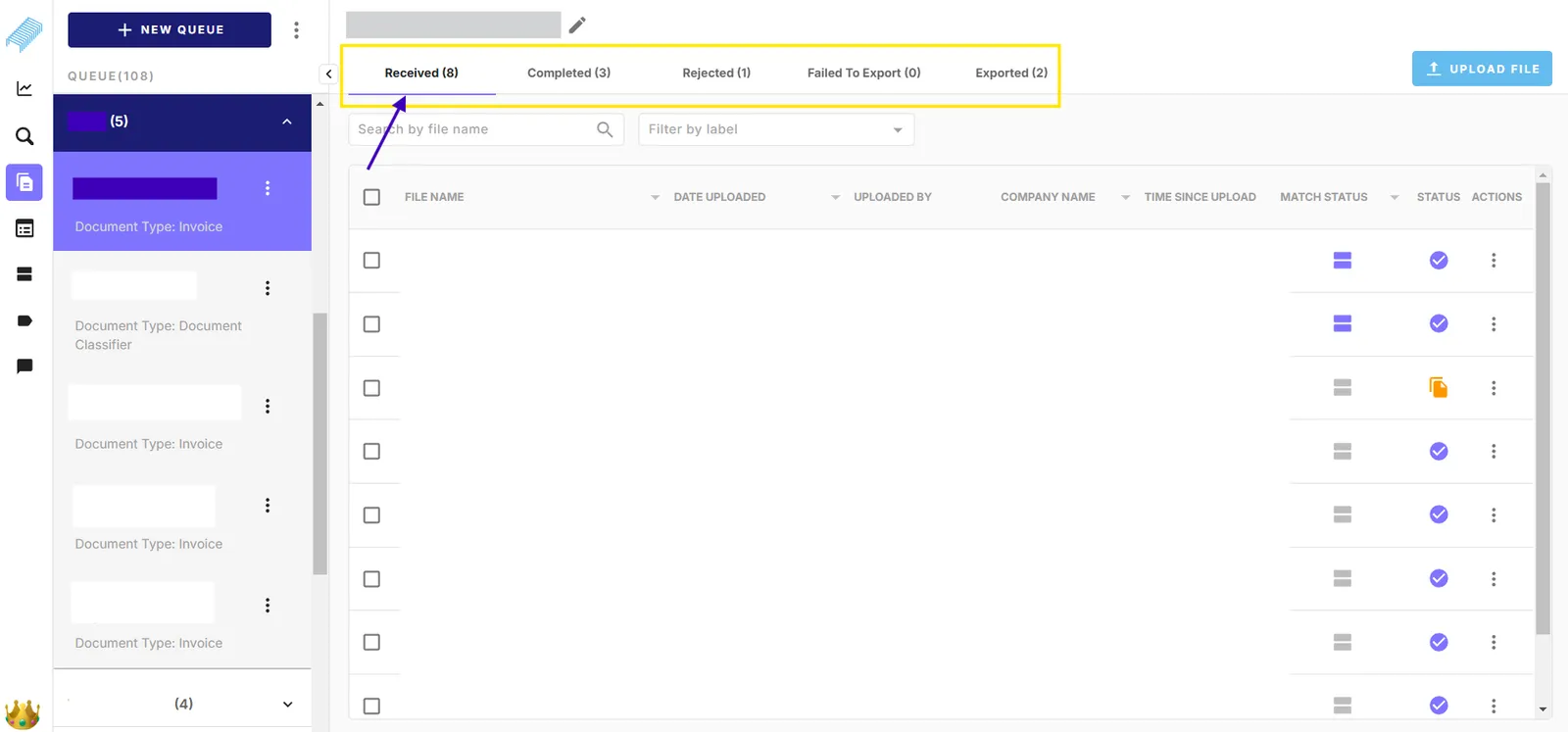
The digits inside brackets (x) indicate the number of documents in each tab. The number will be immediately updated when the document movement actions are triggered such as moving to different status, moving to another queue, and removing documents.
Open a document in a new tab

The system highlights the record that you are about to select in purple. Normally when you click anywhere on the record, the system will display the selected document in the current browser tab.

To open the document in a new browser tab, you can hover your cursor and click the arrow icon “*Open in a new tab”.*Once clicked, a new tab of the select document will appear in your browser.

Alternatively, you can hover your cursor over the file name and press Ctrl + Left click. This approach also opens a new tab of the selected document in your browser.

Also, You can use Ctrl + Left click with several parts on the interface to open a new tab such as

  • Queue name
  • Received, Completed, Rejected, Failed to Export, Exported
  • Match status column with “Click to view matching”
  • Advance search results listing documents
  • Template documents in Model
  • Matching tuples