

Monthly release notes for Staple AI
April '26
April’s release brings a major capability in intelligent document handling, Malaysia e-invoice compliance for AR teams, deeper audit trails for field edits, and several workflow and integration improvements.
1. Intelligent Splitting
Multi-type documents are common in logistics, finance, and operations. A single uploaded file might contain purchase orders, delivery orders, and invoices bundled together. Splitting them manually before processing is slow and error-prone.
This release introduces Intelligent Splitting, which removes that step entirely.
How it works
Define splitting instructions once, in plain language, the same way you would prompt an LLM. Every bundled document uploaded to the queue gets split into its individual components automatically, before processing begins.
- Supports any document mix — invoices, POs, delivery orders, KYC packets, medical files, and more
- Up to 2,000 characters of instruction, so you can be as specific as the document requires
- Map one instruction set to multiple queues
- Splitting happens within seconds, even on large multi-page files
Example: A 14-page file containing purchase orders, delivery orders, and invoices was uploaded. Intelligent Splitting produced 11 separate documents — 8 purchase orders, 2 delivery orders, and 1 four-page invoice — all ready for processing.
After splitting: Use Labels and Rules to auto-route each document type to its correct queue. Full documentation and walkthrough video at docs.staple.ai.
Benefits
- No manual sorting before upload
- Works across industries where composite documents are the norm
- Scales to high-volume document intake without added effort
2. Malaysia E-Invoice: Accounts Receivable
Malaysian businesses are legally required to submit invoices to the government tax portal (MyInvois, run by LHDN) for verification before sharing them with buyers. Without automation, this means manual data entry for every invoice, strict formatting requirements, and no reliable audit trail.
Staple now handles the entire submission process on your behalf, from the moment an invoice is issued to the point it is verified by the government and ready to share with your buyer.
How it works
There are four things you can do:
Submit an invoice — Send your invoice data to Staple via API. Staple converts it into the government-required format, validates the details, and submits it to MyInvois. You get an instant confirmation with a tracking reference. You do not need to wait for the government to finish processing before continuing your workflow.
Check the status — Use the tracking reference to see where your invoice stands. The government returns one of five statuses: Valid, Invalid, Cancelled, Submitted (still processing), or Duplicate. If the invoice is rejected, Staple tells you exactly which fields need to be corrected before resubmitting.
Retrieve the official copy — Once an invoice is validated, the government issues an official verified copy. You or your buyer can retrieve this using the reference on the invoice. Useful for verifying invoices you receive from suppliers before approving payment.
Cancel an invoice — If an invoice was submitted by mistake, it can be cancelled within 72 hours of government validation. After that window, a Credit Note is required instead.
Benefits
- No manual submissions to the MyInvois portal
- Your ERP or finance system stays in the loop without human intervention
- Every mapping, submission, and cancellation is logged for audit
- Errors are surfaced with specific field-level details, not vague rejection messages
Reach out to hello@staple.io to get this enabled for your organisation.
3. Data Edit Audit
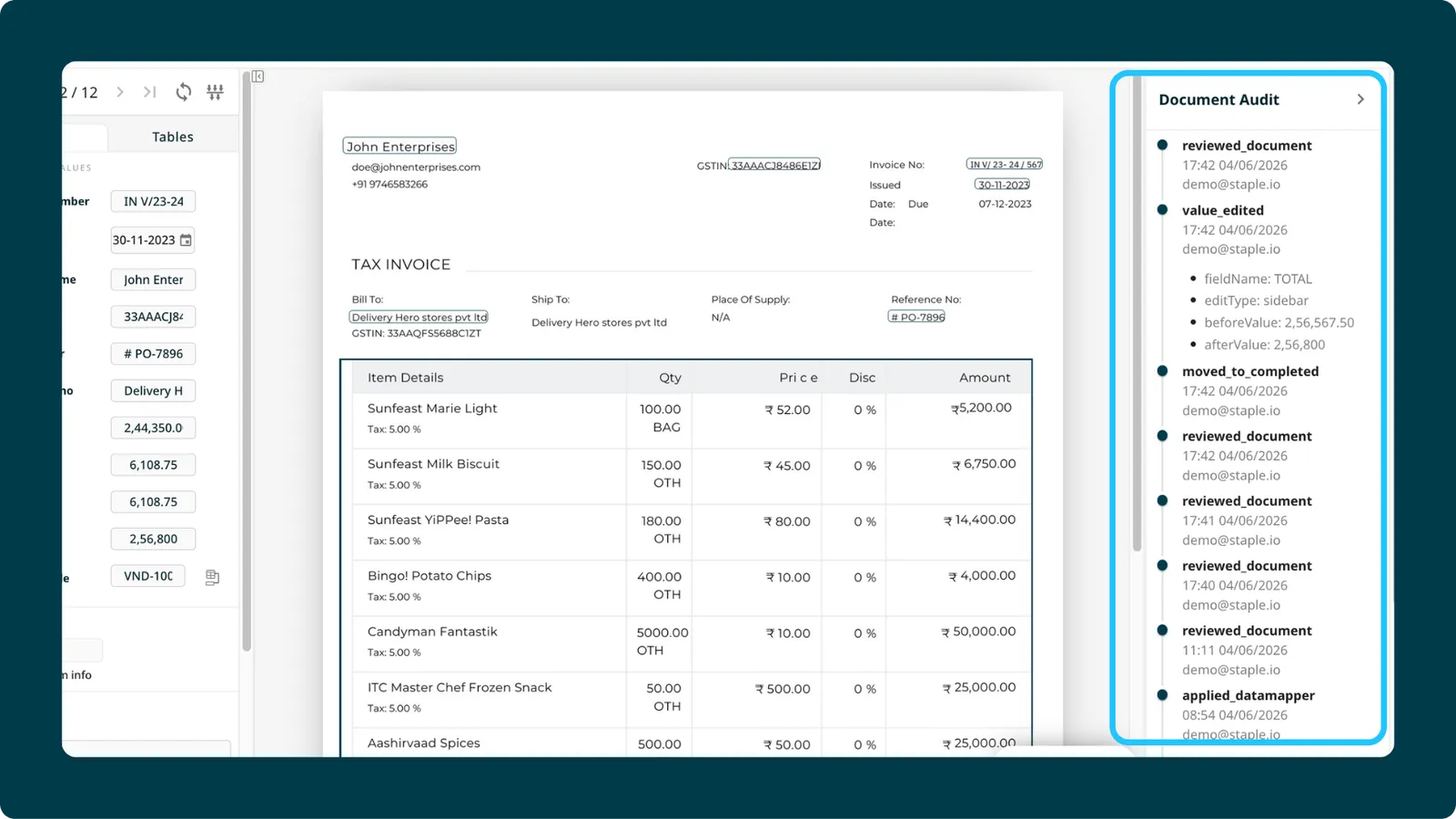
When a user changes a field value during document review, there was no structured record of what changed, when, or by whom. For compliance-heavy workflows, that gap matters.
This release introduces Data Edit Audit for sidebar fields.
How it works
Every change a user makes to a sidebar field during scanning is now detected, captured, and written to the audit record. The edit event includes what was changed and a log entry that surfaces cleanly in the UI and in audit downloads.
What’s included
- Full edit detection for sidebar fields
- Audit events created on save
- Edit metadata visible in the UI and downloadable
Benefits
- Know exactly what was changed after extraction
- Demonstrate data integrity to auditors and downstream systems
- Supports compliance requirements in regulated industries
Minor enhancements
1. Uploaded Tab Enabled by Default / “Received” Renamed to “Scanned”
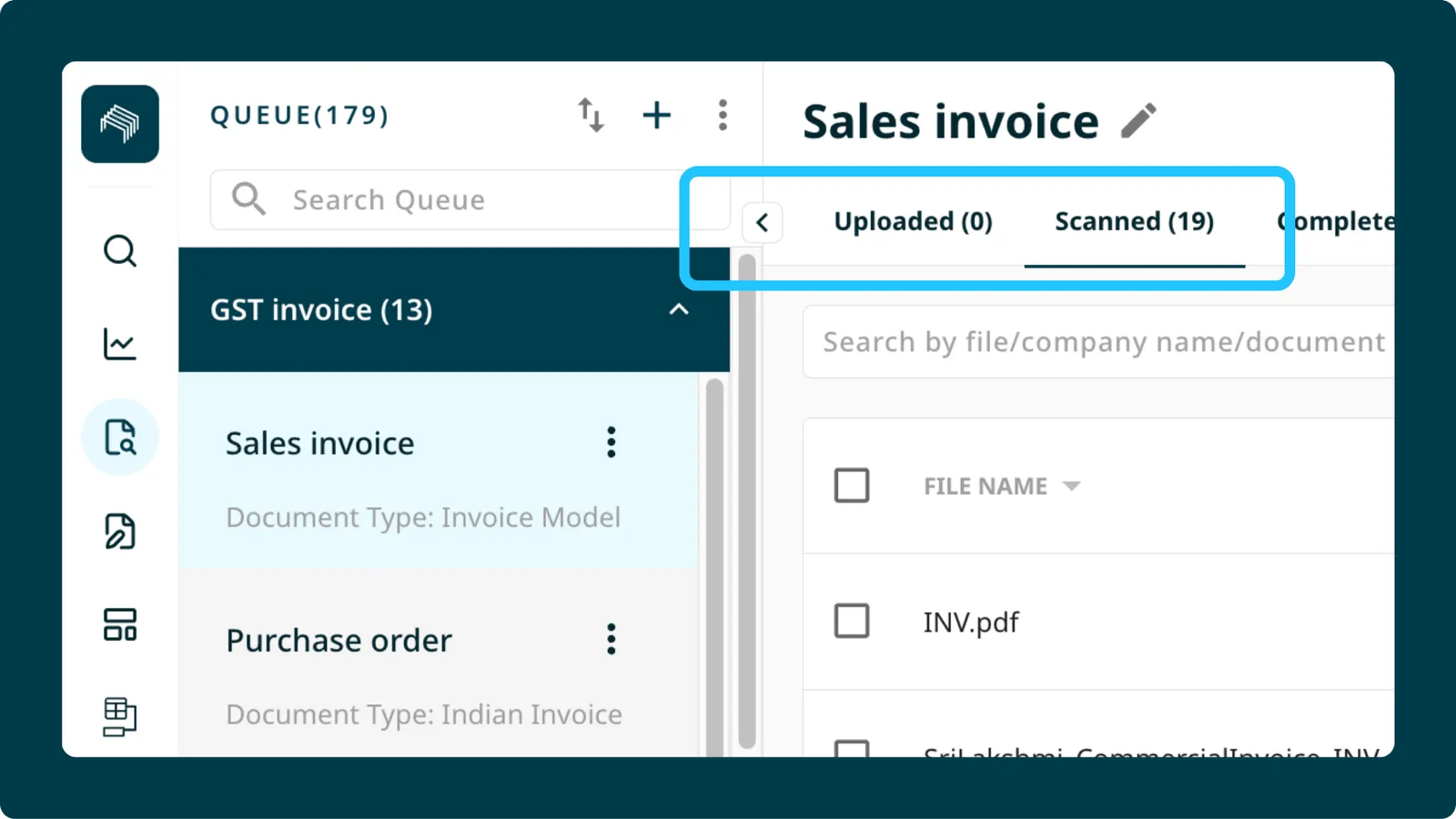
Two UI changes shipped together to make the document intake workflow clearer.
The Uploaded tab is now enabled by default on all new queues. Documents still move automatically to the processing queue unless you change the default intake settings. Existing workflows are unaffected.
The “Received” state has been renamed “Scanned” across the UI. A “Previously called ‘Received’” hint is displayed for continuity. The underlying backend state is unchanged, so no integrations break.
2. Search Improvements
Search V2 is faster and more relevant. Content search now returns results ordered by relevance, with the most relevant matches at the top. Page load times for search results are reduced. The advanced search pagination UI has also been simplified, removing the page input and total page count display to reduce visual noise.
3. SAP Concur: USD Currency Conversion
For customers using the Concur integration, Staple can now convert invoice amounts to USD at the current day’s exchange rate before export. If an invoice arrives in EUR (or any non-USD currency), the conversion happens automatically during the Concur export flow. Reach out to support@staple.ai to enable this for your organisation.
4. PDF Generation: Updated Visual Standard
Generated PDFs now reflect updated header styling, sidebar colouring, and form layout. The header limit has been increased from 5 to 25, and multi-page table support has been added so large tables are no longer cut off across pages. One standard format applies across all customers for consistency.
5. Email Integration: Logos and Inline Images Excluded by Default
When using the email integration, Staple previously ingested inline comment images and logos alongside document attachments. These are now excluded by default. Only actual document attachments are scanned. The email integration sync has also been fixed to use the current mapping date rather than the first mapping date, preventing duplicate scans when re-syncing.