

Monthly release notes for Staple AI
May '26
May’s release focuses on data enrichment, bulk export, duplicate detection improvements, and queue management enhancements. These updates give teams more control over data quality, large-scale operations, and document workflows.
1. Data Enrichment
Documents arrive with gaps: missing vendor codes, supplier names that don’t match your master list, typos in line items. Data Enrichment fills these automatically using your own reference data.
How it works
- Upload your reference data (vendor master, SKU list, customer master) as a knowledge base
- Create enrichment rules that define what to look up and which document field to populate
- Rules run automatically on every document processed by the queue
Matching types
- Exact — for codes and IDs
- Fuzzy — for name variations and typos
- Semantic — for meaning-based matches across inconsistent terminology
You control the outcome
- No match found: leave as-is, blank the field, or set a default value
- Multiple matches: use first result, best-scoring result, or a default
- Existing extracted value: overwrite it or keep it
What gets enriched: header fields and table columns. Every enriched cell is visually marked and logged in the audit trail.
Also shipping: Set Value Conditions
SET rules now support IF conditions — a value only applies when the document meets your criteria.
- Supports numeric thresholds, date comparisons, boolean checks, and string equality
- Up to 5 conditions per rule, combined with AND
2. Bulk Download
If you need to extract a large volume of documents and their data for audits, reporting, or migrations, the old approach was to download them one at a time.
This release introduces Bulk Download.
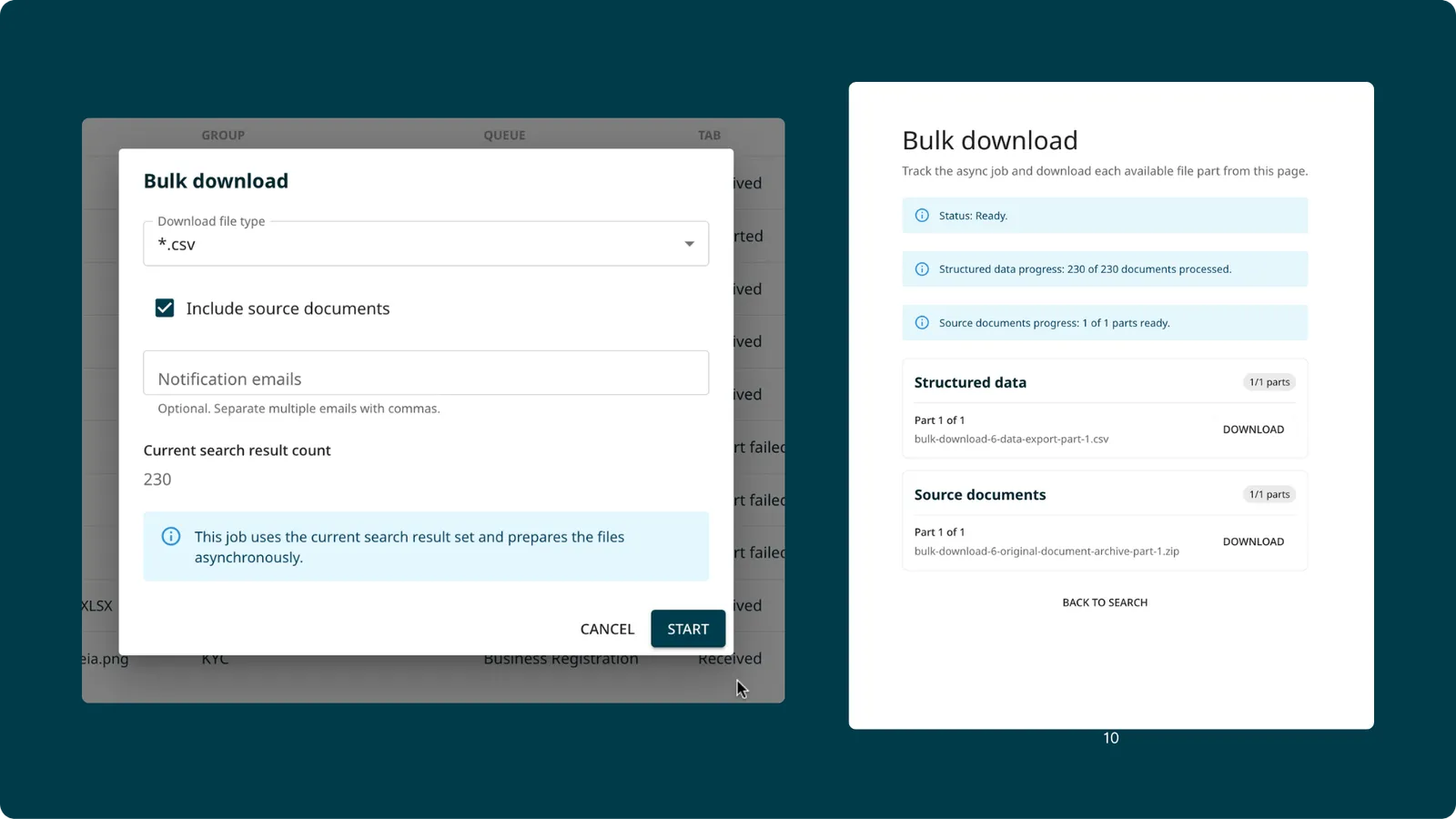
How it works
From the Global Search page, filter the documents you need and trigger a bulk download job. The export runs in the background. You receive two emails — one confirming the job started, and one with the download links when it is ready.
- Choose from CSV, XML, JSON, or TXT
- Optionally include the original source files alongside the extracted data
- Supports up to 200,000 documents per batch
- Role-based access control: only authorised users can trigger bulk downloads
- A status screen in the product lets you track active and completed jobs
What’s next: Bulk Download from Global Search is the first phase. The same capability for the Scanning view page is coming next.
Benefits
- No more one-by-one downloads for large datasets
- Usable for audits, reporting, migrations, and custom dashboards
- Background processing means you can continue working while the job runs
3. Duplicate Detection for Removed Documents
Duplicate checking previously did not account for documents that had been removed from the system. If a document was deleted and someone re-uploaded the same file, it would pass through without being flagged.
This is now fixed.
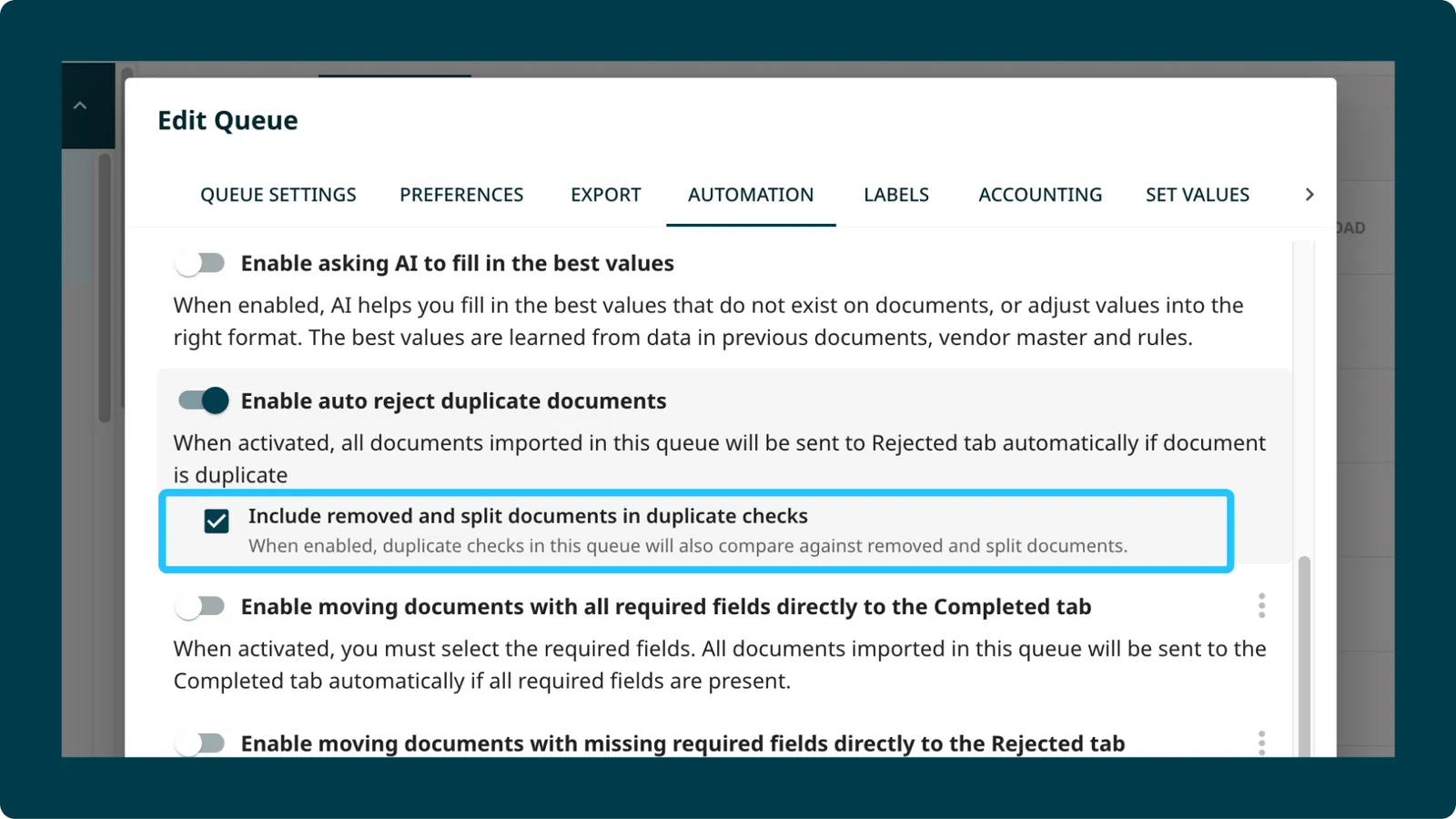
Duplicate checks now run against removed documents too. If a re-uploaded file matches a document that was previously removed, it is flagged as a duplicate.
This also applies to documents produced by Intelligent Splitting. If a parent document was split and some pages were removed, a re-upload of the same source file will still be caught.
Minor enhancements
1. Queue Rule Limit Increased from 5 to 10
You can now add up to 10 rules per queue, up from the previous limit of 5. A guardrail ensures only one “compare against previous documents” rule is allowed per model, so the higher limit does not affect performance.
2. File Size Warning Before Export
When exporting documents to integrations that have file size limits (such as SAP Concur’s 10 MB cap), Staple now shows a warning on the export screen if the file is likely to exceed the limit. Previously, oversized files would fail silently or return a vague error. You now see the issue before triggering the export.
3. “Not Found” Label in Reconciliation
When a reconciliation rule applies a label based on a match outcome, the “Not Found” label is now visible across all reconciliation views and included in export APIs. This makes it easier to identify line items or headers where no matching record was found, without having to dig into individual documents.
4. Query Performance
Document count queries load faster. Queue-level counts and reporting views respond more quickly.