

Monthly release notes for Staple AI
August '26
August is the biggest release of the year so far. Reconciliation 2.0 goes live as a configurable matching engine, Singapore customers can self-register for InvoiceNow and activate IRAS tax submission without operator help, and Data Enrichment now shows reviewers every candidate match instead of a single silent pick.
1. Reconciliation 2.0
A completely rebuilt reconciliation engine, live on production. Rather than a fixed invoice-matching tool, it is a configurable engine you set up once for your own use case. It is designed and architected to fit invoice matching, KYC verification, AML and more, so it drops into very different business problems without being rebuilt each time.
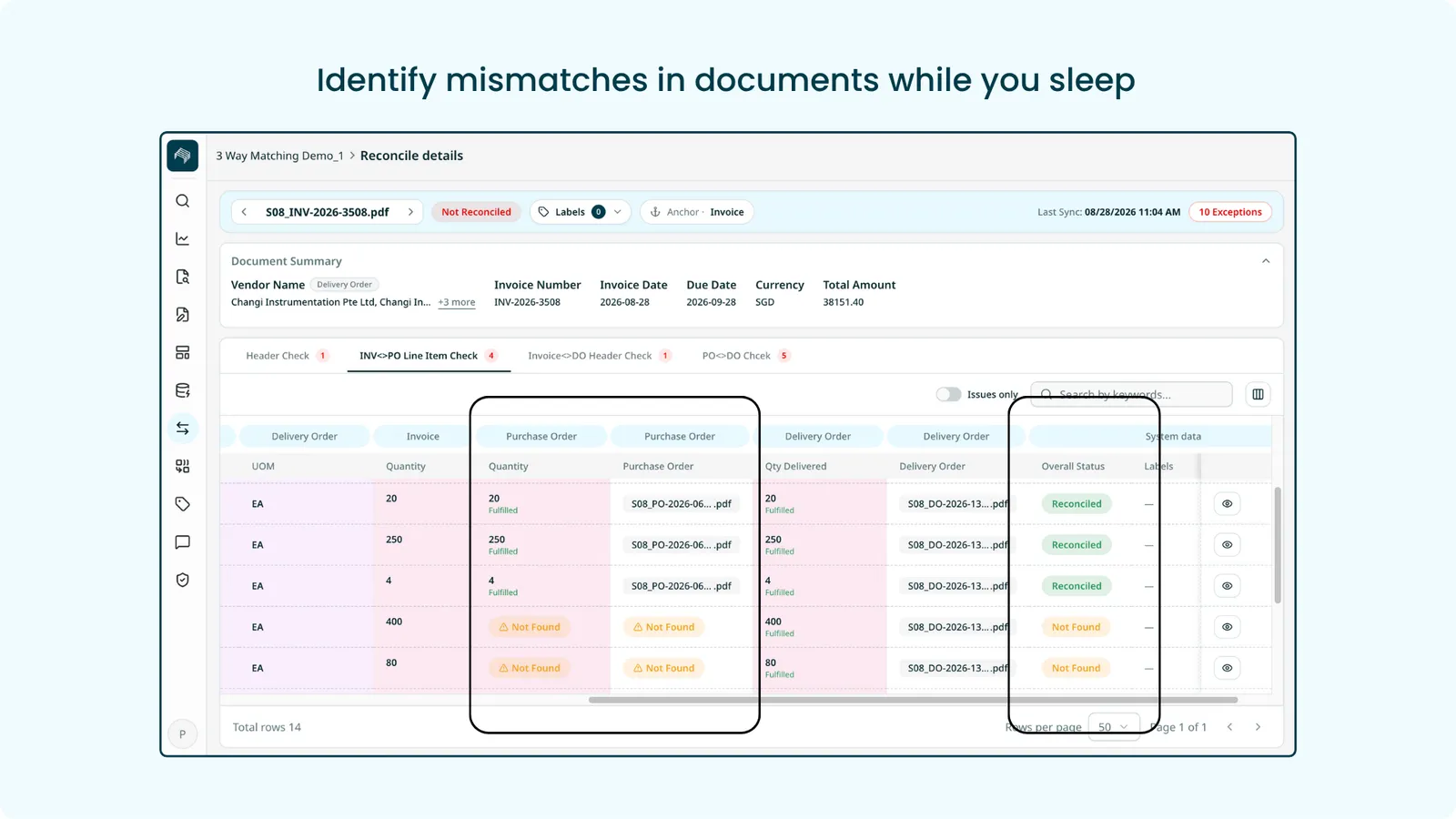
What’s in it
- Guided three step setup, with a built-in Staple Guide walking you through every field
- Relationship Tree giving you a visual picture of the whole setup as you build it
- Any field to any field: header to header, header to line, line to header, line to line
- Fully user configurable comparison rules and tabs, with tolerance so small variances still pass
- Fulfilment tracking: what is covered, what is still open
- User defined labels: name outcomes in your own terms, like Missing PO or Over-billed Quantity
- Reconcile Details with an issues-only view, and the original scan alongside the extracted data
- Custom columns, saved filters and search across your Linking Sets
Benefit
One engine adapts across use cases instead of a rebuild each time. Teams configure their own matching logic rather than commissioning a custom build, and reviewers see exactly which values disagree instead of hunting through documents. The setup is self-serve, guided at every step.
2. Singapore e-Invoicing: InvoiceNow Self-Onboarding and IRAS Submission
Singapore is mandating e-invoicing through InvoiceNow, the national network run on Peppol by IMDA. Staple is an IMDA-accredited Peppol Access Point, and this release delivers two things: customers can now register their own Singapore companies end to end, and they can activate IRAS tax submission on top of it.
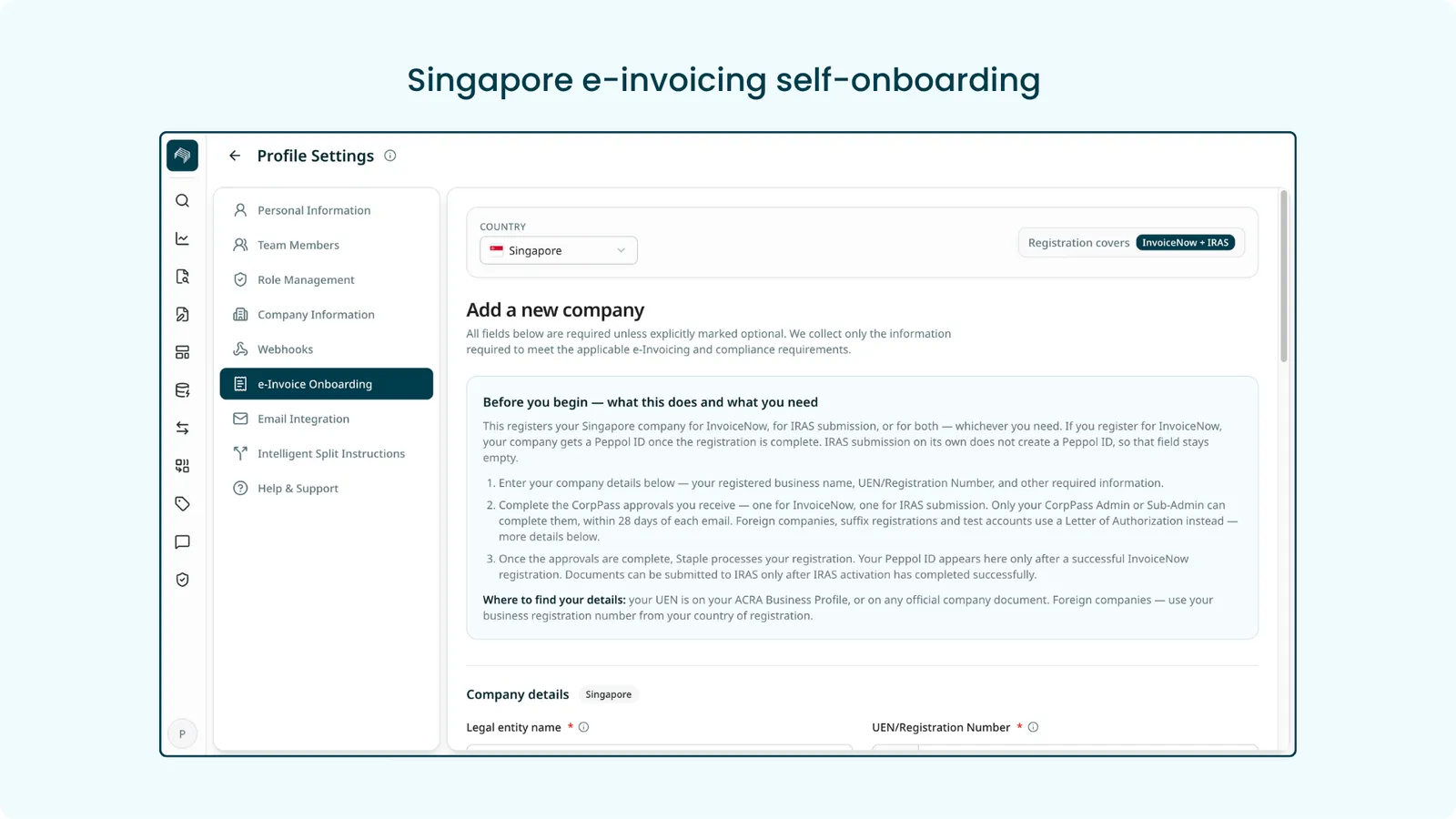
Self-onboarding
- Register from the UI: add a Singapore company, provide the required details, and authorise Staple through CorpPass. A Letter of Authorization covers exception cases
- One registration covers both directions. A company is registered once as a single Peppol participant that both receives (AP) and sends (AR) e-invoices
- Registration state is visible at every step, so you can see which companies are Registered and which are still Processing, with localised UEN validation on entry
- Assign receiving queues: each registered company maps to one or more Staple queues, so incoming e-invoices land in the right place
- Outbound e-invoice generation: send invoice data to Staple and Staple produces a compliant PINT-SG e-invoice and delivers it over Peppol. Invoices and credit notes are supported document types
IRAS tax submission
IRAS submission is a separate, optional activation with its own CorpPass approval, tracked independently of registration as Not active, Processing or Active. Turning it on requires a GST registration number, and it is a single switch covering both directions.
- Submitted alongside a Peppol exchange: on a sale, once the invoice is sent successfully over Peppol, a copy is submitted to IRAS. On a purchase received over Peppol, the received document is submitted automatically
- Submitted to the tax authority only: transactions that never travelled over Peppol can still be reported to IRAS as tax data. This covers sales and purchases made outside the network, aggregated point-of-sale and simplified tax invoices, and aggregated petty cash
Benefit
Customers meet the Singapore mandate on their own timeline, in one place, without an operator driving registration on their behalf. Multi-entity groups can onboard every company themselves, and GST-registered businesses get tax submission handled automatically once activated.
3. Data Enrichment: Multi-Match Picker and Matching Rows
When Data Enrichment filled a field, a reviewer could see the value but not why it won. If the lookup hit several rows, a twelve-way match looked identical to a clean single match, and correcting a wrong pick meant retyping by hand. Now every candidate is visible and selectable.
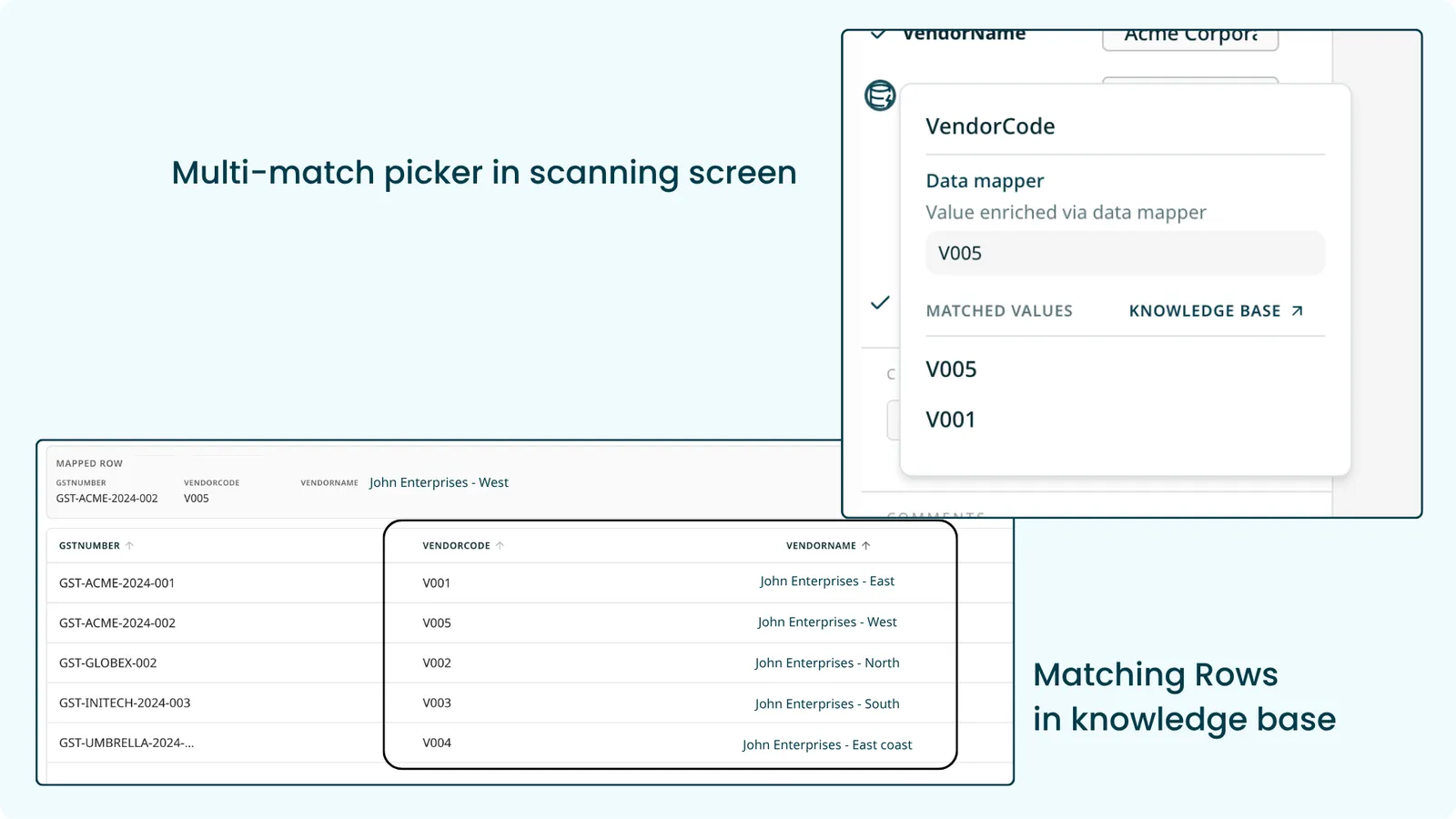
How it works
- See every match in one click. Each enriched field carries a single data enrichment icon, shown by default. Clicking it lists the matched values directly under a “Matched values” header with the count, so there is no menu to step through
- The winner is marked as the best match, and the field’s current value is marked as selected. The list scrolls and pages in more candidates for a long match set
- Pick a value to correct the field. Selecting a candidate replaces the value and is recorded as a user edit, so it overrides enrichment and survives re-evaluation. The field also stays free-text editable when no candidate fits
- View the source rows in the dataset. A control at the bottom of the list opens the read-only knowledge base panel, which now offers an “All records” and “Matched records” switch below the pinned selected row. The matched view shows just the candidates with the winning row highlighted, and filters apply to whichever view you are on
- Works the same on sidebar fields and complex-table cells. When nothing matched, the icon still opens and reads “No matched values”
Benefit
Reviewers can tell a clean single match from a multi-match at a glance, understand why a value was chosen, and fix a wrong pick by selecting the right row instead of retyping it.
Enhancements
Scanning
Bulk label management
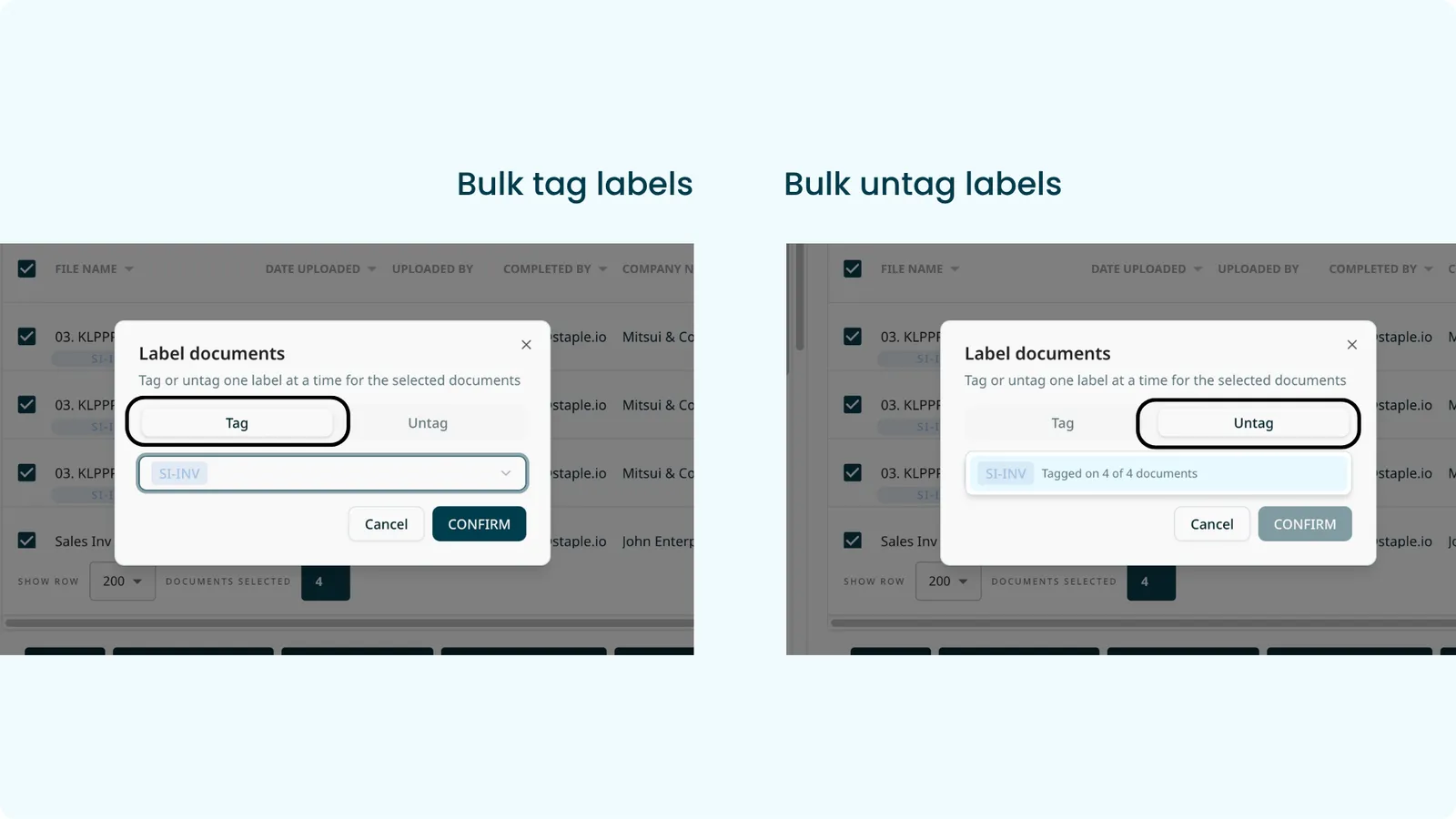
The Label documents action now has Tag and Untag modes in one dialog. In Untag mode the picker lists only the labels currently applied to your selected documents, each with a count of how many of them carry it, and confirming removes that label from every selected document that has it. This makes reassignment practical at volume: when someone goes on leave, you can untag them and tag a replacement across a hundred documents at once.
Separately, tagging or untagging a label on a single document now only requires access to the document itself. The add, edit and delete labels permission is still required for label administration and bulk label management.
New rejection reason: Wrong billing name
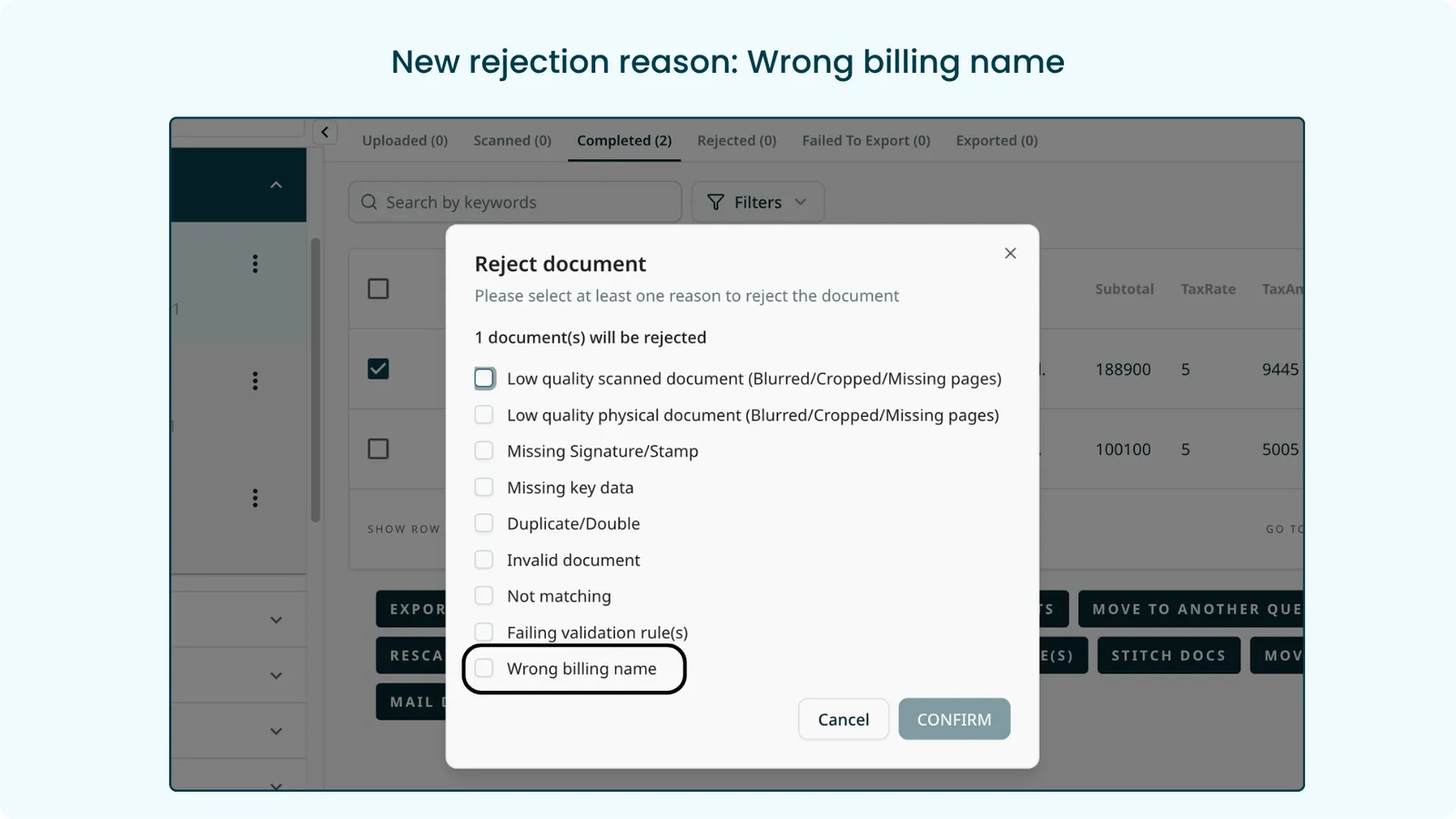
A ninth reason has been added to the reject document menu, available to all customers. The existing reasons are unchanged.
Bulk rescan raised from 10 to 100 documents
Bulk rescan now handles up to 100 documents in one action, across both the interface and the processing behind it.
Data Enrichment
- Overwrite policy now checks the current value, not the extracted value. Where two rules depend on each other, the second rule previously only ever looked at the originally extracted value. Now, whenever a value changes, whether a user edited it or another rule wrote it, the dependent rule is re-applied against the current value.
- Data Enrichment and Set Value now run on documents created from structured files. Documents that arrive as XML or JSON and are converted into a readable document, e-invoices being the common case, previously could not use these rules because both only ran after a scan. Now the queue’s Set Value and Data Enrichment rules fire at creation with no extra configuration, on both header fields and line-item columns. Values resolve in the standard order of Set Value, then Data Enrichment, then user edit, and AI refresh re-runs enrichment on demand.
API
- Confidence scores are now available in downloads and through the API. Until now the score only existed in the review screen, so anyone processing documents programmatically received extracted data with no signal of which values were reliable. In the interface, Download data extracted has a new “Include confidence scores” checkbox. Through the API, the Download Data endpoint takes a new optional
includeConfidenceparameter. Each document gains a singleConfidenceblock carrying the combined score plus its OCR and extraction parts, for header fields and for table headers, columns and rows. Existing integrations are unaffected because the parameter defaults to off. Available for JSON and XML on custom model queues using complex tables. API reference
Export
- Email columns moved to the end of the CSV. Spreadsheet tools cap a single cell at 32,767 characters, so a long email body would overflow into the next row and push the remaining records out of alignment, making the file hard to read and filter. All email columns now sit at the end of the CSV, so the rest of the record stays intact. This applies to Export data, Download data, and Global Search bulk download, and no columns were removed.
Bug Fixes
- Intelligent feedback: deleting a template no longer leaves the document attached to it, so the document stops appearing trained and the control behaves correctly. Matching also no longer uses a loose threshold without document type guards, which had produced false-positive matches against completely unrelated documents.
- Model fields: deleting an optional field no longer leaves the remaining fields in the wrong order.
- Global Search: Invoice model document types stay available in search after model members are removed.